App Deployments
An App Deployment represents an AI/ML application deployed using a Profile Bundle; the Profile Bundle must contain a Workload Profile with the type Application. An App Deployment is the primary method that data scientists and ML engineers use to deploy their workloads onto Compute Pools.
When you complete the App Deployment workflow, PaletteAI performs the following actions:
- Selects or provisions a Compute Pool (the underlying Kubernetes cluster)
- Deploys your application using the selected Profile Bundles
- Exposes access URLs to the deployed application (if supported by the workload)
Workload Provisioning
Applications can be deployed to a dedicated or shared Compute Pool. PaletteAI must provision the Kubernetes cluster before it can deploy an application.
The following diagrams illustrate a simplified order of events when deploying AI/ML applications via the App Deployment workflow. To learn more about the Compute Pool provisioning process, refer to our Compute Pool Provisioning guide. For an in-depth look at the complete deployment flow, from Compute Pools to workload provisioning, refer to our Hub as Spoke guide.
What is an Environment?
An Environment is an abstraction that controls where workloads get deployed. For dedicated and shared Compute Pools, PaletteAI configures the Environment automatically.
Environments are built on Open Cluster Management (OCM) Placements. The Placement's topology policy determines which Kubernetes clusters receive the workload.
Dedicated Compute Pool
For learning purposes, the following example assumes that the user is deploying a dedicated Compute Pool during the App Deployment workflow.
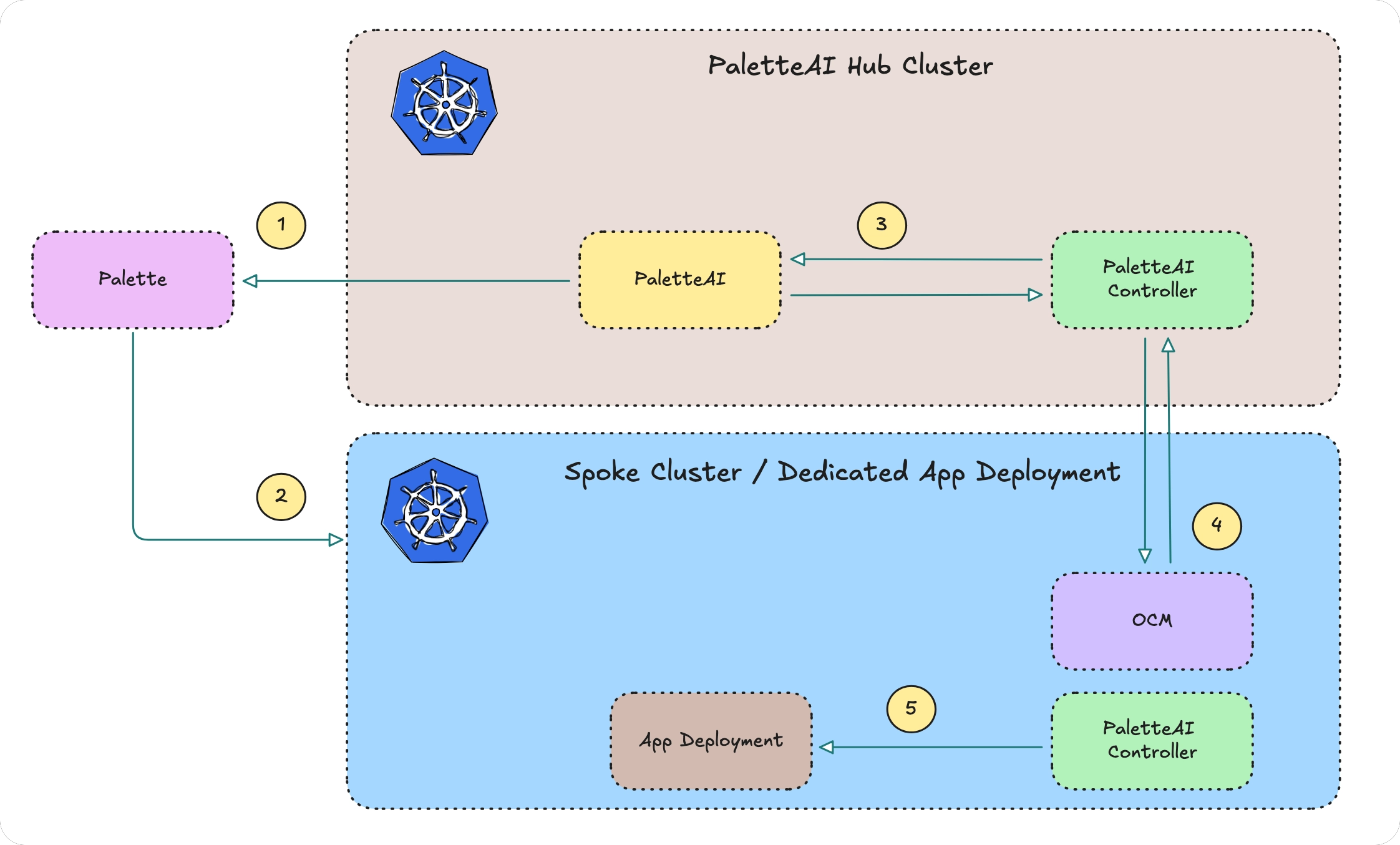
- PaletteAI gathers the available Compute resources and requests Palette to create a dedicated Kubernetes cluster.
- Palette creates a Kubernetes cluster.
- PaletteAI registers the cluster as a spoke with the hub
- The hub cluster installs the necessary controllers on the spoke, such as Flux and the OCM work agent.
- PaletteAI deploys the AI/ML application to the dedicated Kubernetes cluster.
Shared Compute Pool
Shared Compute Pools must be created prior to beginning the App Deployment workflow. Since the cluster is already registered with Palette, only the workload is distributed.
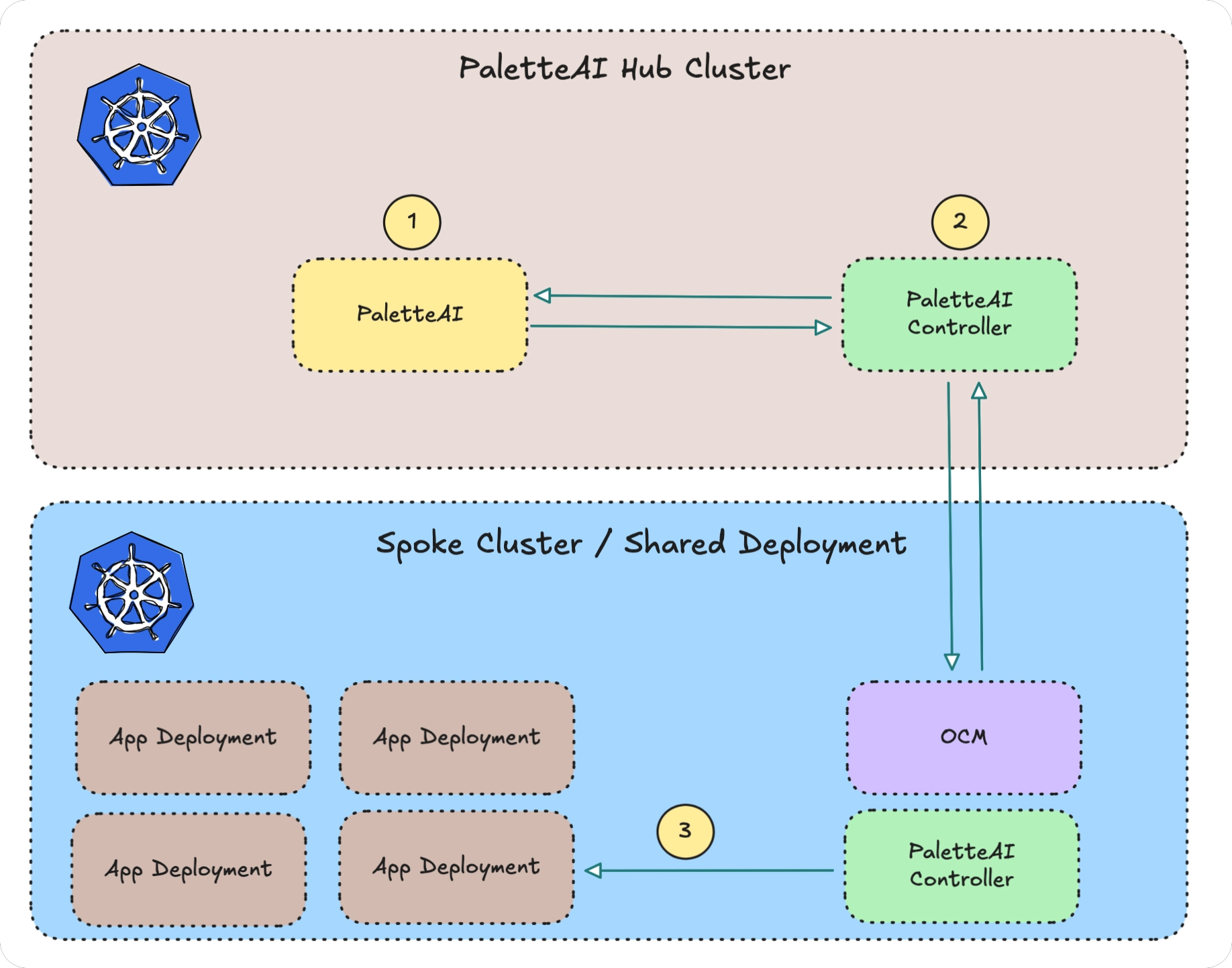
- PaletteAI submits a request to deploy a new application to a shared environment.
- PaletteAI prepares the application for deployment by selecting the appropriate Kubernetes cluster and namespace.
- The application is installed in the shared Compute Pool.
GPU Quotas
Tenants and Projects can enforce GPU quotas to prevent over-allocation. If your application request exceeds the allotted resource quota, you cannot deploy your application. Refer to GPU Quotas for more information.
Resources
Refer to the following articles to learn more about how App Deployments interact with other PaletteAI concepts:
- Compute Pools - The infrastructure where AI/ML applications run
- Profile Bundles - Packaged application and infrastructure definitions
- Projects - Provide namespace isolation and GPU quotas