Security
PaletteAI is designed with a security-first principle. The following sections detail the security features and design decisions currently in place.
Security Components
PaletteAI's security architecture is made up of the following components:
-
Kubernetes Role-Based Access Control (RBAC)
-
User Interface (UI) components, client-side and server-side
-
Hyper Text Transfer Protocol Secure (HTTPS)
The components work together to provide a secure and reliable authentication and authorization system. PaletteAI uses Kubernetes RBAC system to manage access control. The same actions a user can do in the Palette UI can be performed directly through the Kubernetes API server. Dex is used to support a number of different authentication mechanisms and to issue authentication tokens that can be used to authenticate with the Kubernetes API server the PaletteAI UI.
All internal PaletteAI components are assigned a unique SSL certificate through cert-manager. Cert-manager is deployed as part of the PaletteAI installation and setup process. You can customize cert-manager to use your own Certificate Authority (CA) to issue the certificates. Unless a different cert-manager issuer is configured, cert-manager will issue self-signed certificates to each of the PaletteAI components deployed inside the hub cluster. The certificate is required to enable HTTPS communication between the different PaletteAI components. All PaletteAI components are configured to use HTTPS by default.
The following sections cover in greater detail how authentication and authorization are handled in PaletteAI.
Authentication
PaletteAI uses Dex for user authentication. Dex is an open-source identity service broker that supports a number of different authentication mechanisms. Through Dex, you can leverage your existing SAML, OIDC, or LDAP infrastructure to authenticate with PaletteAI and the hub cluster's Kubernetes API server without having to manage another set of credentials. Dex was chosen to enable you to integrate PaletteAI with your existing Identity Provider (IdP), or other authentication services your organization may already have in place.
PaletteAI supports local users creation and management through Dex. Be aware that this is a limited capability and does not natively support RBAC. We recommend using an IdP for production usage. If you must use local users, enable user impersonation to map them to Kubernetes groups. Refer to the Local Dex Users section for more information.
By default, PaletteAI expects the hub cluster to be configured to trust Dex as an OIDC provider. By trusting Dex as an OIDC issuer, the hub cluster accepts authentication tokens issued by Dex for the Kubernetes API server. This also allows you to configure tools, such as kubectl, to authenticate with the Kubernetes API server using authentication tokens issued by Dex. This latter point is important for non-UI workflows, or GitOps workflows, as it enables you to authenticate with the Kubernetes API server using the same mechanism as the PaletteAI UI. You can configure Dex during the PaletteAI installation process to map OIDC groups to the PaletteAI RBAC roles. The OIDC group mapping is what bridges your IdP groups to the PaletteAI RBAC roles.
You can learn more about how to configure Kubernetes to use an OIDC provider in the official Kubernetes documentation. The formal Dex documentation also has a page that explains how Kubernetes Authentication Through Dex operates.
The PaletteAI UI has a server-side component, Canvas, inside the hub cluster. Canvas is what communicates with Dex and the Kubernetes API server. The client-side component of PaletteAI is what you can observe and interact with in your browser. The client-side component only communicates with Canvas and Dex and does not communicate directly with the Kubernetes API server. This design decision provides PaletteAI with a better security posture by keeping credentials out of the browser and ensuring sensitive operations are performed on the server side rather than the client side. The PaletteAI UI has a cookie that maps the user to a session. The session cookie itself does not contain any credentials; it only points to the server-side session data. Canvas stores the actual authentication tokens inside that session entry and uses them to authenticate with the Kubernetes API server.
The following diagram provides a high-level overview of the in-browser authentication and authorization flow in PaletteAI.
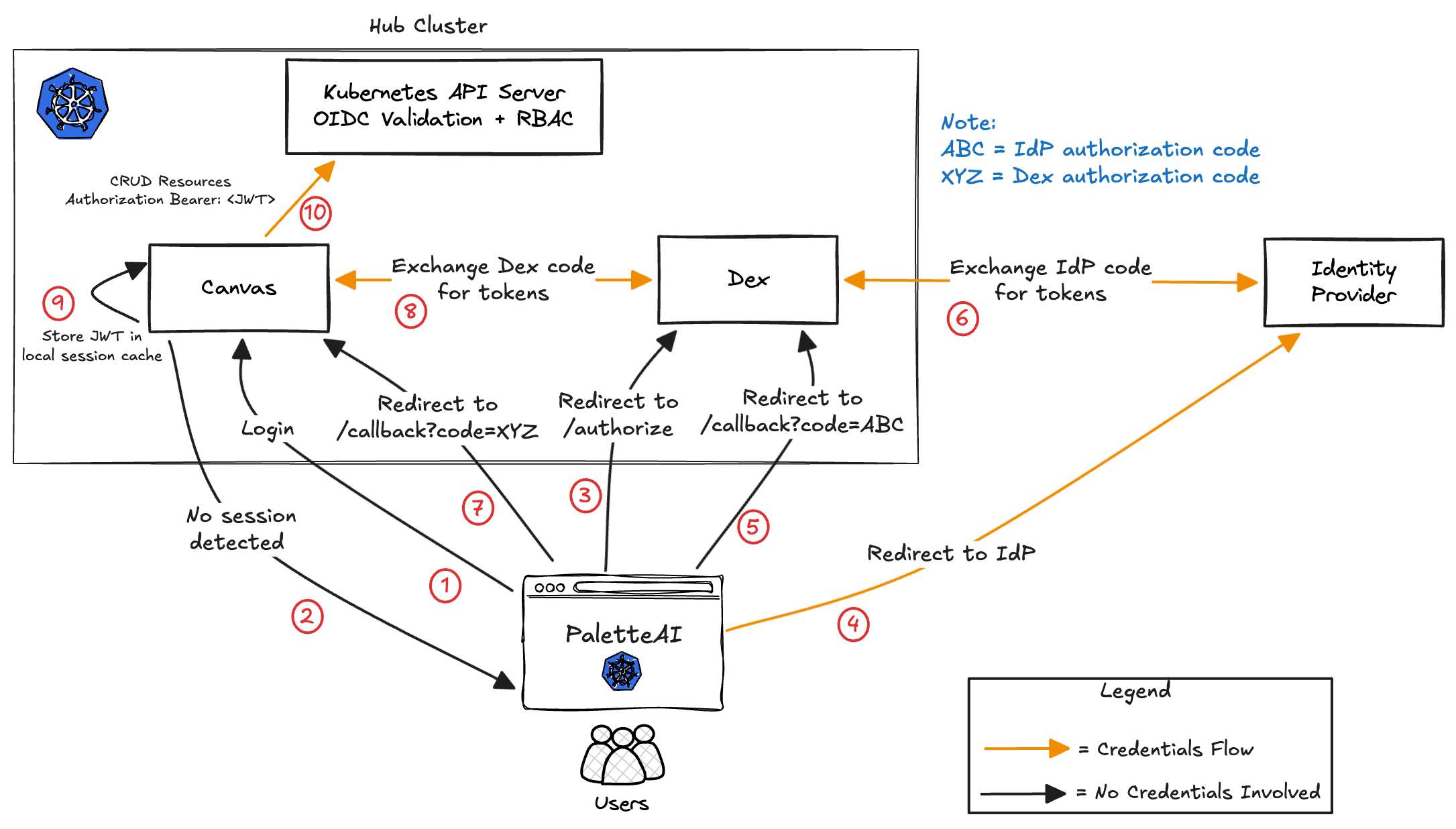
- A user navigates to the PaletteAI UI in their browser.
- Canvas detects that no active session exists and initiates the login flow.
- The browser is redirected to Dex’s
/authorizeendpoint to begin the OAuth2 authorization code flow. - If SSO is selected, Dex redirects the browser to the external Identity Provider (IdP). If email/password is selected, Dex handles authentication directly and skips to Step 6.
- If an external IdP is used, the IdP login page is loaded in the browser. The user enters their credentials, which are sent directly from the browser to the IdP. Upon successful authentication, the IdP redirects the browser back to Dex with an IdP authorization code (ABC).
- Dex exchanges the IdP authorization code (ABC) with the IdP’s token endpoint and receives IdP tokens. Dex then generates its own authorization code for the Canvas client.
- Dex redirects the browser back to the PaletteAI callback endpoint with a Dex authorization code (XYZ).
- The Canvas backend exchanges the Dex authorization code (XYZ) with Dex’s
/tokenendpoint to obtain signed tokens (including a JWT and optionally a refresh token). - Canvas stores the JWT in its server-side session cache and issues a session cookie to the user’s browser. The session cookie maps the user to the server-side session. Its expiration is tied to the refresh token lifetime (if present), falling back to the JWT expiration when no refresh token is available.
- For subsequent requests, Canvas includes the user’s JWT in the
Authorization: Bearer <JWT>header when making API calls to the Kubernetes API server. The API server performs OIDC validation and RBAC authorization to determine whether the requested action is allowed.
Preventing Cross-Site Request Forgery and Replay Attacks
In addition to PaletteAI's session cookie that maps the user to a session, PaletteAI also creates a temporary cookie during the sign-in process that uses a unique state parameter to prevent Cross-Site Request Forgery and replay attacks. The state parameter value is generated by PaletteAI UI's client-side and included in the authentication request. The unique state value is propagated to the IdP. The IdP will insert the state parameter in the redirect to the callback route. The callback route has logic that compares the received state token with the original value created by the client-side and stored as a cookie. If the two values do not match, the authentication flow is canceled. The temporary cookie is deleted after the authentication flow is completed. This process occurs in all sign-in requests to ensure that the request originated from the client-side component of PaletteAI. The state cookie also has a maximum age of five minutes. If the authentication flow is not completed within five minutes, the state cookie is deleted automatically by the browser.
This is an additional security measure to ensure that requests come from the PaletteAI UI, not from a malicious source. You can learn more about the benefit of unique state parameters in authentication flows in the article Prevent Attacks and Redirect Users with OAuth 2.0 State Parameters from Auth0.
All communication between the PaletteAI UI client side component and Canvas is done over HTTPS. By design, all PaletteAI UI requests that interact with the Kubernetes API server are proxied through Canvas. This ensures that all requests are authenticated before being sent to the Kubernetes API server. The authorization is delegated to the Kubernetes API server, which determines if the request is allowed based on the user's RBAC permissions.
Authorization
PaletteAI uses Kubernetes RBAC to manage access control. The access that you have in PaletteAI is dictated by the PaletteAI role you have access to. This access spans the PaletteAI UI and when interacting directly with the Kubernetes API server in the hub cluster through GitOps workflows. The IdP group you are assigned to is mapped to a PaletteAI role during the installation and setup process. The PaletteAI roles have access to the various Custom Resources (CRs) that PaletteAI creates and manages. You can find a complete list of all the PaletteAI CRs on the Custom Resources page.
The following diagram provides a high-level overview of the server-side authentication and authorization flow in PaletteAI.
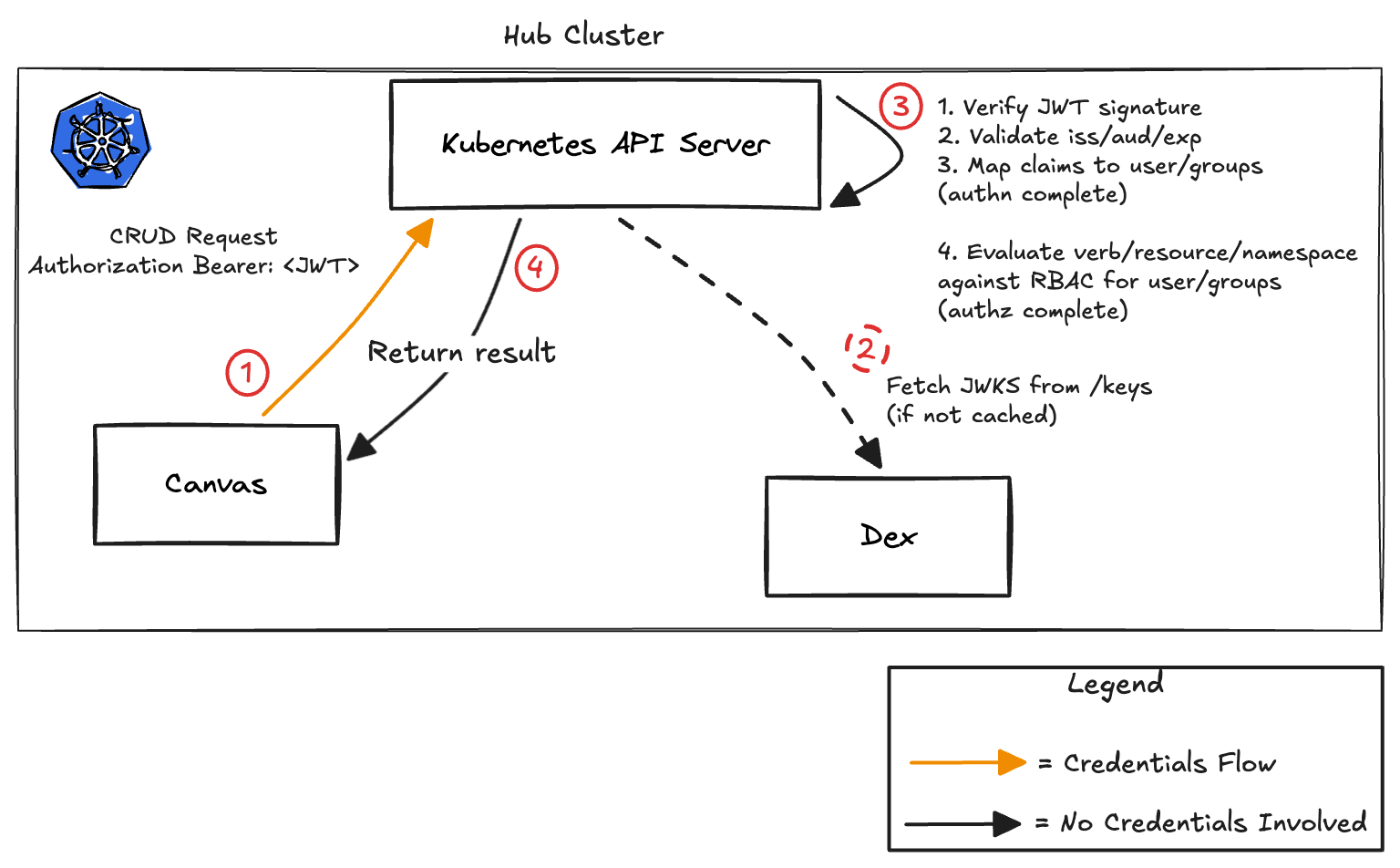
- Canvas sends a CRUD request to the Kubernetes API Server with an
Authorization: Bearer <JWT>header. - The API Server fetches Dex’s JWKS (public signing keys) if they are not already cached.
- The API Server authenticates and authorizes the request:
- Verifies JWT signature
- Validates issuer (
iss), audience (aud), and expiry (exp) - Extracts claims from the JWT and maps them to user and groups (authentication complete)
- Evaluates RBAC rules for the requested verb/resource/namespace (authorization complete)
- The API Server returns the result:
- Allowed → operation performed
- Denied → 403 Forbidden
- Invalid token → 401 Unauthorized
The Dex issuer endpoint is typically exposed via ingress. The API server must trust the CA certificate of whatever component terminates TLS: either a load balancer or Dex itself. If using a self-signed CA certificate, the Kubernetes API server's --oidc-ca-file flag must be configured appropriately.
Local Dex Users
PaletteAI supports local users creation and management through Dex. You can configure local Dex users to be mapped to Kubernetes groups and Kubernetes users if user impersonation is enabled. Check out the User Impersonation page to learn more about how to configure local Dex users to be mapped to Kubernetes groups and Kubernetes users.
The local users are stored inside the cluster by default using Dex's Kubernetes storage method. If the hub cluster is deleted or the Dex storage is lost, the local users will also be lost. You can configure Dex's storage to use a different storage backend, such as a database, to persist the local users. However, by using an IdP, you can ensure that the users are managed outside of the hub cluster and are not lost in the event of a cluster failure.
If user impersonation is disabled, then no RBAC capability is available for local Dex users. This is a limitation from Dex as local users do not have the ability to have groups assigned to them. All local Dex users will inherit the same permissions as the PaletteAI UI service account. However, if user impersonation is enabled, you can use the dexGroupMap configuration to map local user emails to Kubernetes groups, providing RBAC capabilities for local users. If you have configured your Kubernetes cluster to trust Dex as an OIDC provider, use OIDC to manage users and groups. We strongly recommend using an IdP for production usage to enforce the least privilege principle.