OCI Registries
PaletteAI uses OCI (Open Container Initiative) registries to store and distribute workload artifacts between hub and spoke clusters. When you deploy an application using the App Deployment workflow, PaletteAI renders your Workload Profile into Kubernetes manifests, packages them as OCI artifacts, and stores them in a registry. Flux controllers, which exist on each spoke cluster, then pull these artifacts and apply them.
This page explains how OCI registries fit into PaletteAI's architecture and the topology options available for different deployment scenarios.
OCI Registries in PaletteAI
OCI registries serve as the distribution mechanism between hub and spoke clusters:
-
Hub cluster - When a WorkloadDeployment (a bundled Workload Profile and Open Cluster Management (OCM) Environment) is created, PaletteAI's workload controller renders Workload Profiles into Kubernetes manifests and uploads them to an OCI registry.
-
Spoke clusters - Flux pulls the manifests from the OCI registry and applies them to the cluster.
This approach decouples the hub cluster from directly communicating with the spokes for workload content. The hub writes to the registry, and the spokes read from it.
Registry Requirements
For an OCI registry to work with PaletteAI, it must:
-
Conform to the OCI Distribution Spec.
-
Accept arbitrary media types (registries that restrict media types, such as Docker Hub, are not supported).
Compatible registry types include, but are not limited to, the following:
-
Amazon Elastic Container Registry (ECR)
-
Azure Container Registry (ACR)
-
Google Artifact Registry
-
GitHub Container Registry (GHCR)
-
Harbor
-
Zot (included with PaletteAI)
Topology Options
PaletteAI supports several OCI registry topologies depending on your deployment scenario.
| Topology | Best For | Learning Curve |
|---|---|---|
| Hub-as-Spoke | - Learning PaletteAI - Development environments - Demos | Beginner |
| Single External Registry | - Most production environments | Intermediate |
| Registry on Hub | - Organizations without a central OCI registry | Advanced |
| Multiple Registries | - Spoke clusters in isolated networks | Advanced |
Hub-as-Spoke
The PaletteAI appliance installation includes a Zot OCI registry that operates inside the hub cluster. In hub-as-spoke mode, where the hub also acts as a spoke, both the hub controllers and Flux can reach the registry via internal Kubernetes networking.
This topology requires no additional configuration but is not suitable for production.
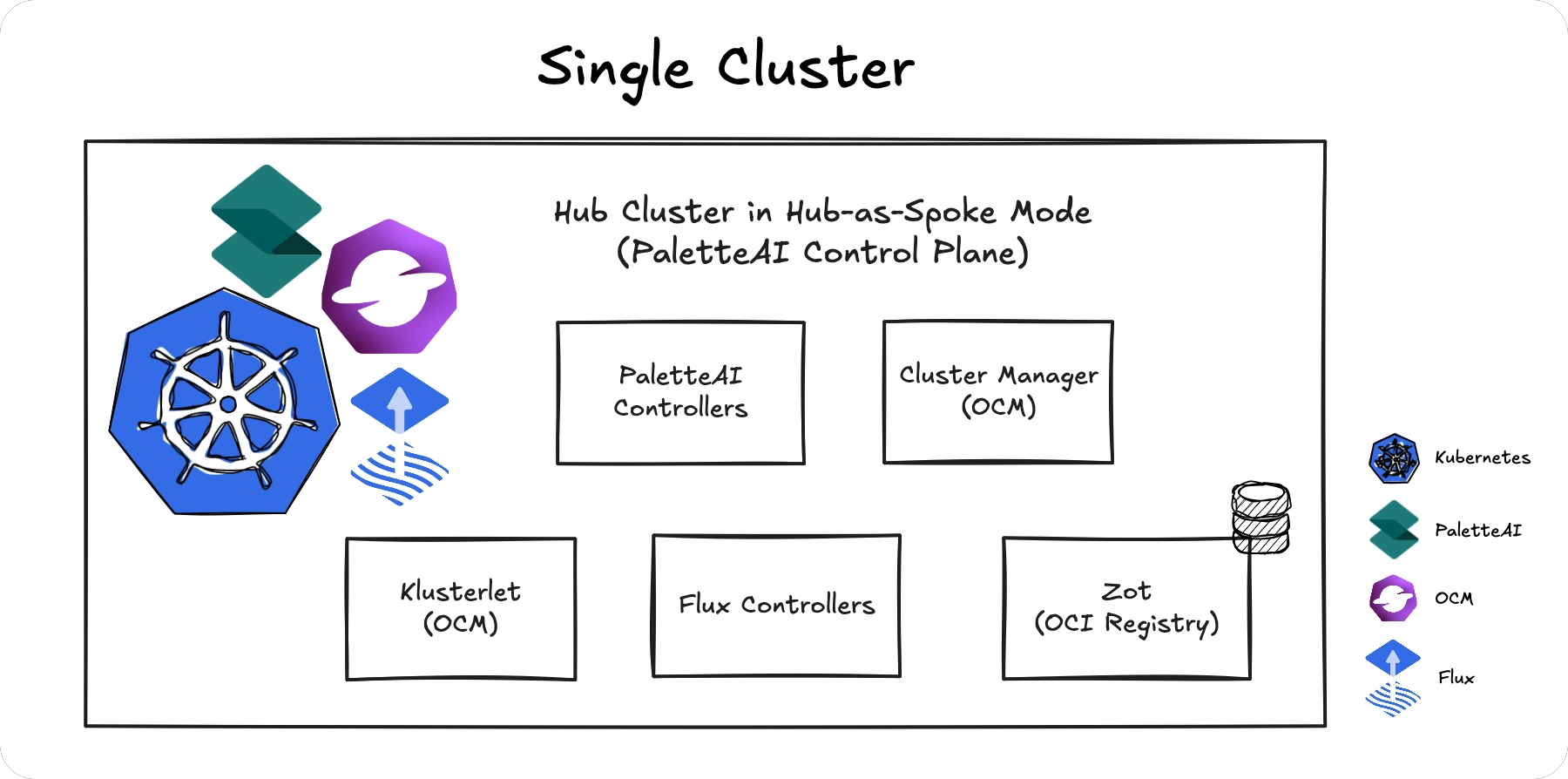
If you add spoke clusters to this topology, the Zot registry must be exposed externally for spokes to reach it.
Single External Registry
Use your organization's existing OCI registry (ECR, ACR, Harbor, etc.) as a shared registry for all clusters. The hub pushes artifacts to the registry, and all spokes pull from the same location.
Requirements
-
All clusters (hub and spokes) must have network connectivity to the registry.
-
Registry credentials must be configured for both the hub and spokes.
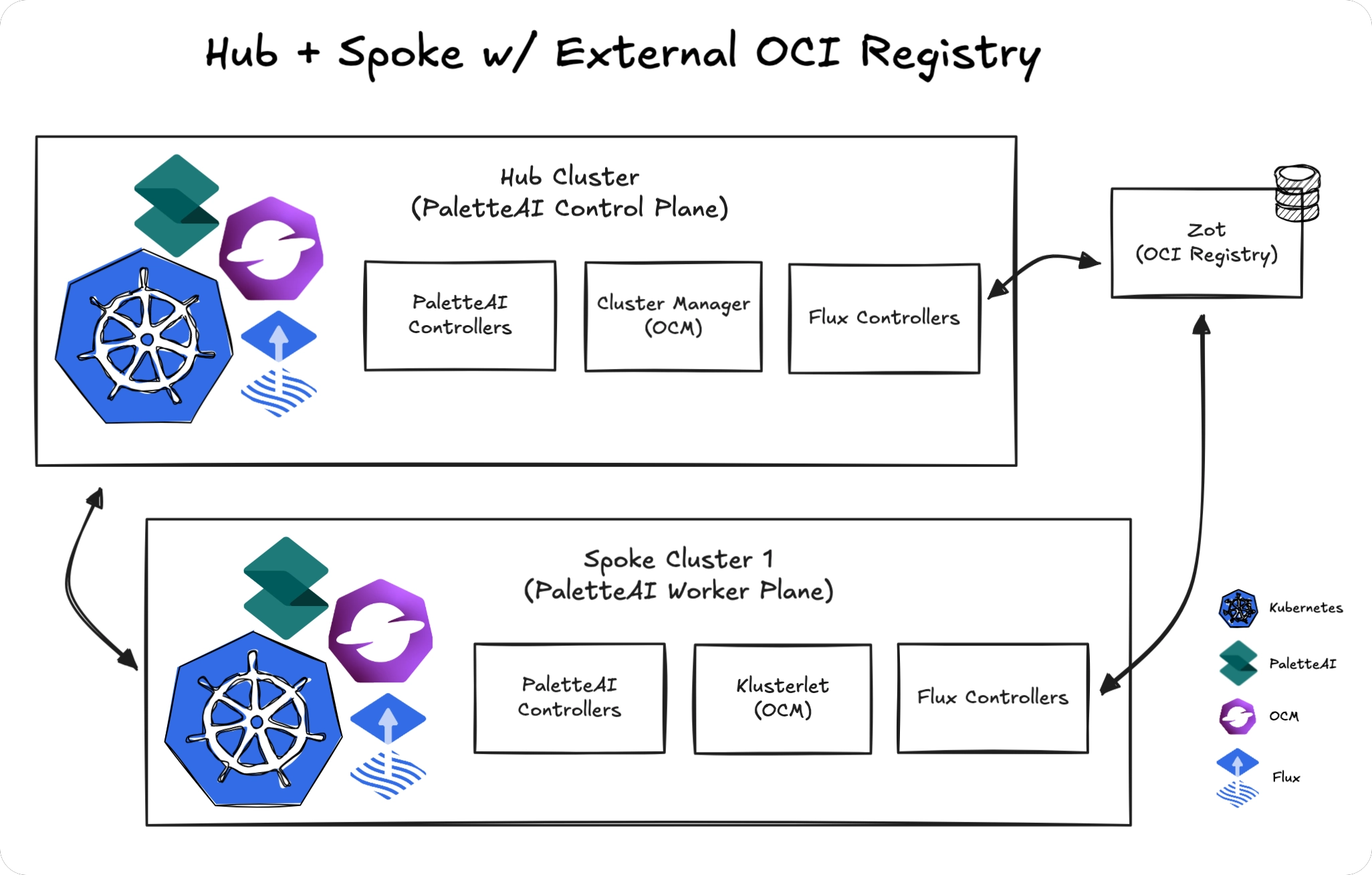
This is the recommended topology for production because it leverages existing infrastructure and provides a single point of management.
Registry on Hub
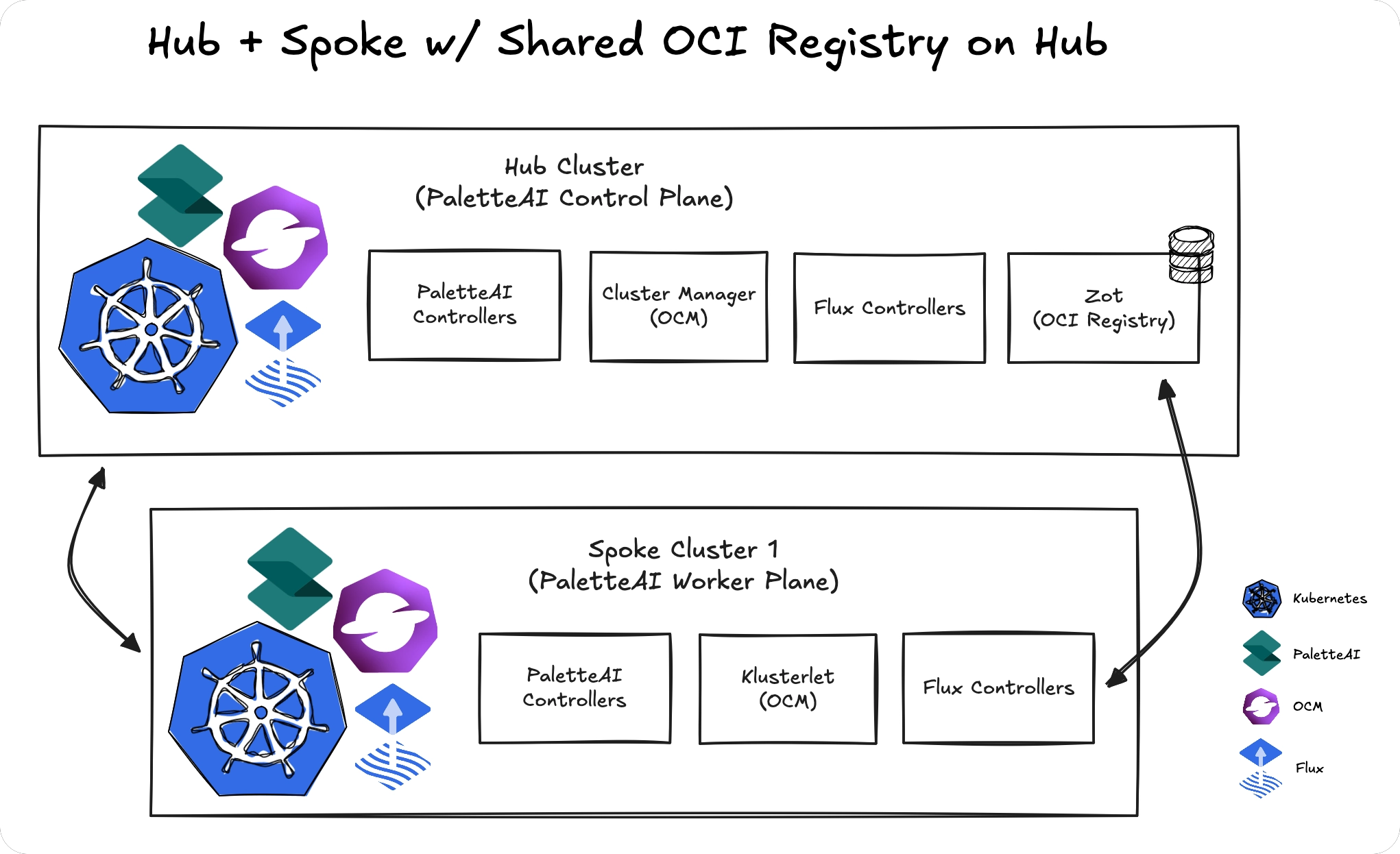
Run a production-grade Zot registry on the hub cluster and expose it externally for spoke clusters to access.
Note that this topology adds operational complexity compared to using an existing external registry.
Requirements
-
Zot must be configured with multiple replicas and persistent storage.
-
The registry must be exposed via a Kubernetes Ingress or LoadBalancer.
-
All spoke clusters must have network connectivity to the hub's registry endpoint.
Multiple Registries
Configure separate OCI registries for different clusters or regional groups when network restrictions prevent a shared registry. Using multiple OCI registries is more resilient than a shared model; however it is more complex to configure and comes with a major caveat.
Resource Federation
PaletteAI automatically distributes and synchronizes (federates) certain resources from the hub cluster to spoke clusters via OCI registries. This ensures spokes have the resources they need without manual synchronization.
Definitions (Global)
ComponentDefinitions, TraitDefinitions, and PolicyDefinitions are periodically pushed to all registered spoke OCI registries. Every spoke cluster receives the same set of Definitions, ensuring consistent capabilities across your infrastructure.
Project-Scoped Resources
Projects, Settings, Tenants, and any relevant Integration Secrets are pushed only to the OCI registries of spokes that belong to the respective Project. This ensures spoke clusters only receive the configuration relevant to their assigned workloads.
Requirements
-
Each spoke must have network connectivity to its configured registry.
-
For automatic Definition and Project-Scoped Resource synchronization, the hub must be able to reach all spoke registries.
-
All spokes must have network connectivity to the hub's API server.
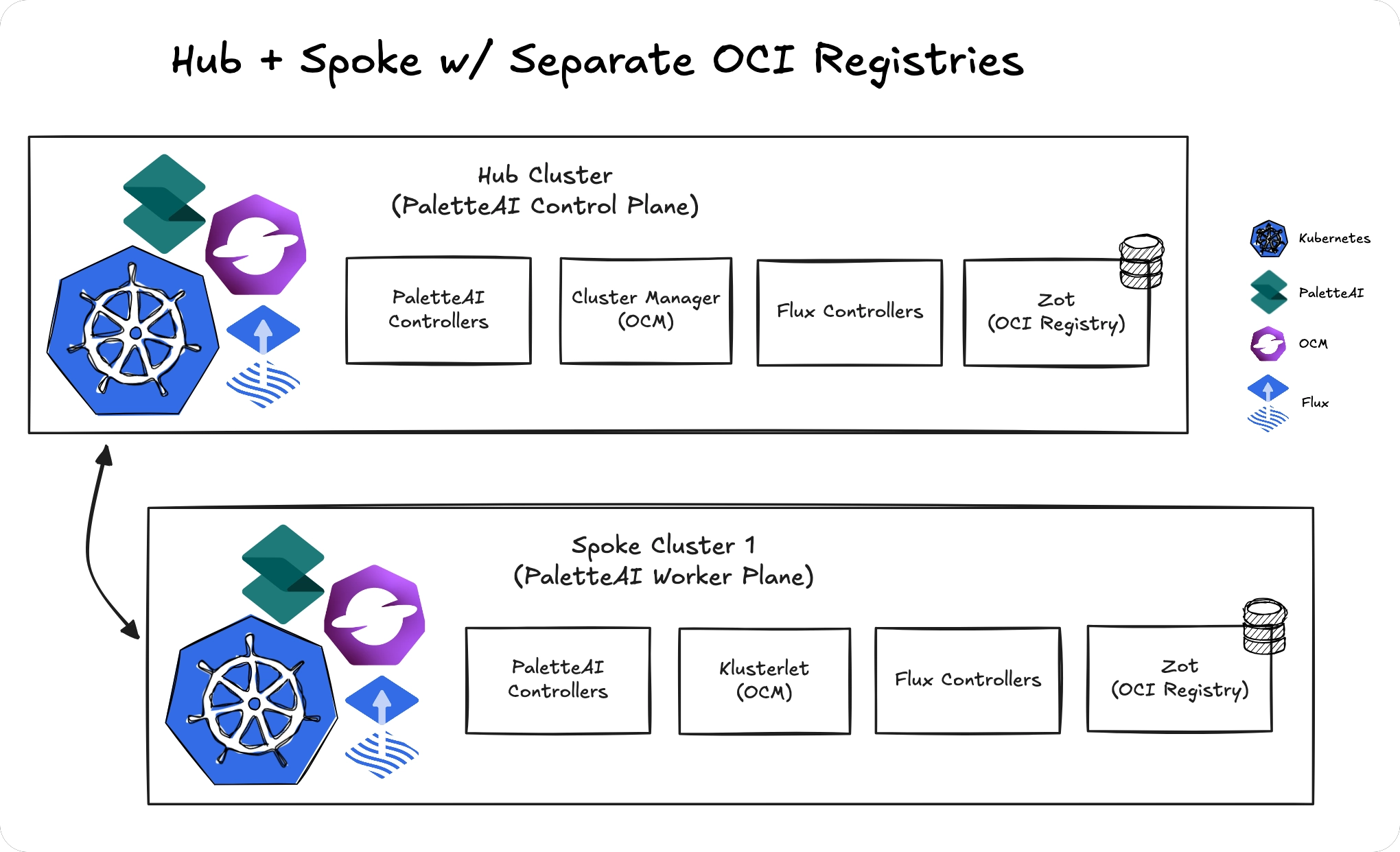
If a spoke's registry is not reachable from the hub, Project and Definition changes must be manually synchronized to that spoke.
Helm Chart Configuration
OCI registry configuration is specified in the PaletteAI Helm chart values.
-
Hub cluster -
hue.ociRegistry -
Spoke clusters -
fleetConfig.spokes[<index>].ociRegistry, where<index>is the name of any valid spoke cluster.
Although there are multiple locations within the Helm chart values where an OCI registry may be configured, all OCI registry configuration sections share common configuration options.
ociRegistry:
  # The endpoint of the OCI registry. Must be routable from the Hub cluster.
  endpoint: 'oci://zot.mural-system.svc.cluster.local:5000'
  # The repository to use within the OCI registry for storing Mural artifacts.
  repository: 'mural-workloads'
  # If true, skip TLS verification of the OCI registry.
  insecure: true
  # Timeout for remote OCI Repository operations like pushing/pulling; defaults to 60s
  timeout: 60s
  # The credential provider to use for OCI registry. Supported values: 'aws', 'azure', 'gcp', 'generic'.
  provider: 'generic'
  # If provided, basicAuth will be ignored. Must exist in the release namespace.
  basicAuthSecretName: ''
  # If provided, a secret named 'oci-basic-auth' will be created and used for basic auth.
  basicAuth:
    # The username to use for the OCI registry.
    username: 'user'
    # The password to use for the OCI registry.
    password: 'user'
  # If provided, proxyData will be ignored. Must exist in the release namespace.
  proxySecretName: ''
  # If provided, a secret named 'oci-proxy' will be created and used for proxy configuration.
  proxyData: {}
  # address: "http://proxy.example.com:8080"
  # username: "user"
  # password: "password"
  # If provided, certData will be ignored. Must exist in the release namespace.
  certSecretName: ''
  # If provided, a secret named 'oci-tls' will be created and used for TLS verification.
  certData: {}
  # ca.crt: |
  #   -----BEGIN CERTIFICATE-----
  #   ...
  #   -----END CERTIFICATE-----
  # tls.crt: |
  #   -----BEGIN CERTIFICATE-----
  #   ...
  #   -----END CERTIFICATE-----
  # tls.key: |
  #   -----BEGIN PRIVATE KEY-----
  #   ...
  #   -----END PRIVATE KEY-----