Project Management
A Project is an isolated workspace where a team deploys and manages AI/ML applications. It is the scope where most day-to-day work happens, and every Project belongs to a parent Tenant. This page collects the common ways to manage a Project and links to the detailed guide for each task.
For how Projects relate to Tenants and the full scope model, refer to Multi-Tenancy.
Project Overview Page
The Project Overview page gives a single, mostly read-only view of a Project's health, capacity, and resources. To edit any value shown here, use Configure Project Settings.
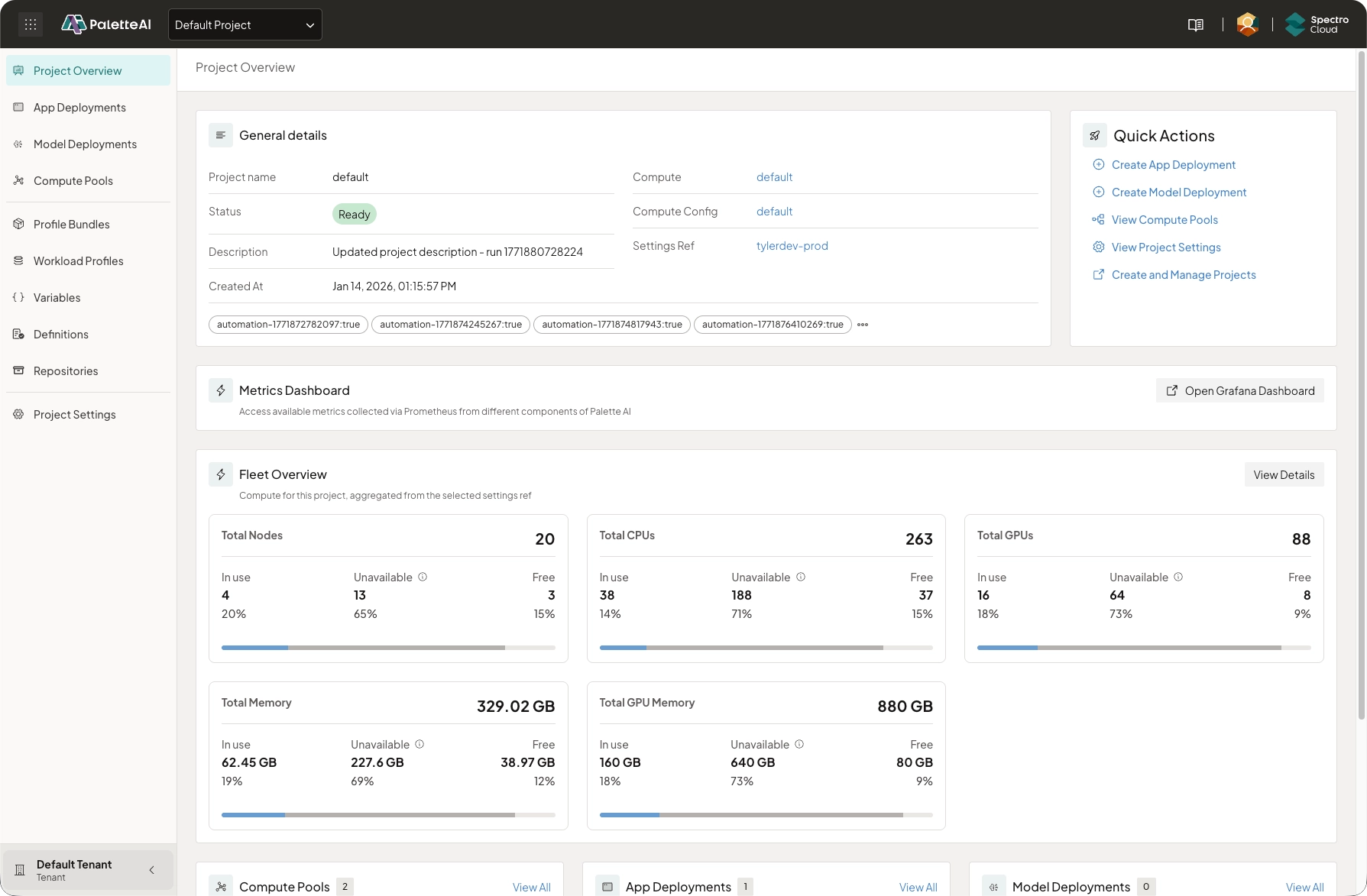
The page is organized into the following sections:
-
General details — Project identity at a glance: name, readiness status, description, creation date, the referenced Settings Ref, and any labels.
-
Quick Actions — Launchers for common Project tasks.
-
Metrics Dashboard — A link to the Grafana dashboard, shown only when an administrator has set the
global.metrics.grafanaUrlHelm value. Refer to Prometheus Agent Setup. -
Fleet Overview — Aggregated compute capacity for the Project (nodes, CPUs, GPUs, memory, and GPU memory), each split into in-use, unavailable, and free, with a details drawer that breaks capacity down by Compute Pool and host.
-
AI Virtual Machines — A list of the Project's AI Virtual Machines, with each virtual machine's state. Its create action is offered when you have permission to create AI Virtual Machines. Refer to AI Virtual Machines.
-
Resource lists — Side-by-side lists of the Project's Compute Pools, App Deployments, and Model Deployments. Each list includes a create action.
-
Status — An expandable table of Project status conditions, each with its message and last-updated time.
Configure Project Settings
The Project Settings page is where you manage a Project's configuration: integrations, OpenID Connect (OIDC) group access (RBAC), GPU limits, target namespaces, Compute Configs, Scaling Policies, Model as a Service Mappings, and the Models list. For the full walkthrough, refer to Configure Project Settings. To add or update the integrations a Project uses (Palette, Hugging Face, and NVIDIA NIMs), refer to Configure Integrations.
Manage Project Resources
Most PaletteAI resources are created and managed at the Project scope: they live in the Project namespace and are usable only within that Project. You create them from the Project's left main menu in the PaletteAI UI, or with a Kubernetes manifest in the Project namespace. Refer to the following guides for additional information:
- Create and Manage Compute Pools
- Create and Manage App Deployments
- Create and Manage Model Deployments
- Create and Manage Profile Bundles
- Create and Manage Workload Profiles
- Create and Manage Scaling Policies
- Create and Manage Repositories
- Create and Manage Variables
Compute Configs, Model as a Service Mappings, and the Models list are managed from Project Settings. To author Definitions (Components, Traits, and Policies), refer to the Definitions concept page.
Create and Delete Projects
Projects are created under a Tenant, from the Tenant scope, rather than from within a Project. To create and configure a Project, refer to Create and Manage Projects. To remove one, refer to Delete Projects.