Tenant Scope
A Tenant represents an organization or major division within your company and groups one or more Projects under a single administrative boundary. Platform engineering teams typically manage Tenants. Tenants provide the following benefits:
-
Organizational grouping — Group related Projects under a single administrative unit. For example, a "Research" Tenant might contain Projects for different research teams.
-
GPU quotas — Set maximum GPU usage across all Projects in the Tenant. This prevents any single team from consuming all available resources.
-
Platform team access — Grant OpenID Connect (OIDC) groups cluster-wide permissions to manage the Tenant and all its Projects.
-
Palette integration — Reference a Settings resource that contains Palette API credentials for cluster provisioning.
Automatic Resource Creation
Tenants are cluster-scoped resources; they exist outside of any namespace and can span the entire cluster.
When you create a Tenant, PaletteAI automatically creates a namespace with the name format tenant-<tenant-name> and provisions tenant-scoped RBAC resources (ClusterRoles, ClusterRoleBindings, and shared tenant-namespace Roles) for the OIDC groups specified in spec.tenantRoleMapping. When Projects are created under this Tenant, the Project controller creates per-project RoleBindings to these shared RBAC resources. This ensures platform teams can manage all Projects under their Tenant without manual Role-Based Access Control (RBAC) configuration.
When referencing a Settings resource in settingsRef, the namespace must use the auto-generated Tenant namespace format tenant-<tenant-name>. For example, a Tenant named primary-dev must reference Settings in the tenant-primary-dev namespace.
Default admin user
PaletteAI can include a default Dex local admin user when local users are enabled. For the default credentials, customization options, and operational caveats, refer to Local Dex Users.
For production, use OIDC groups instead of static Dex users. Configure Dex in your Helm chart values.
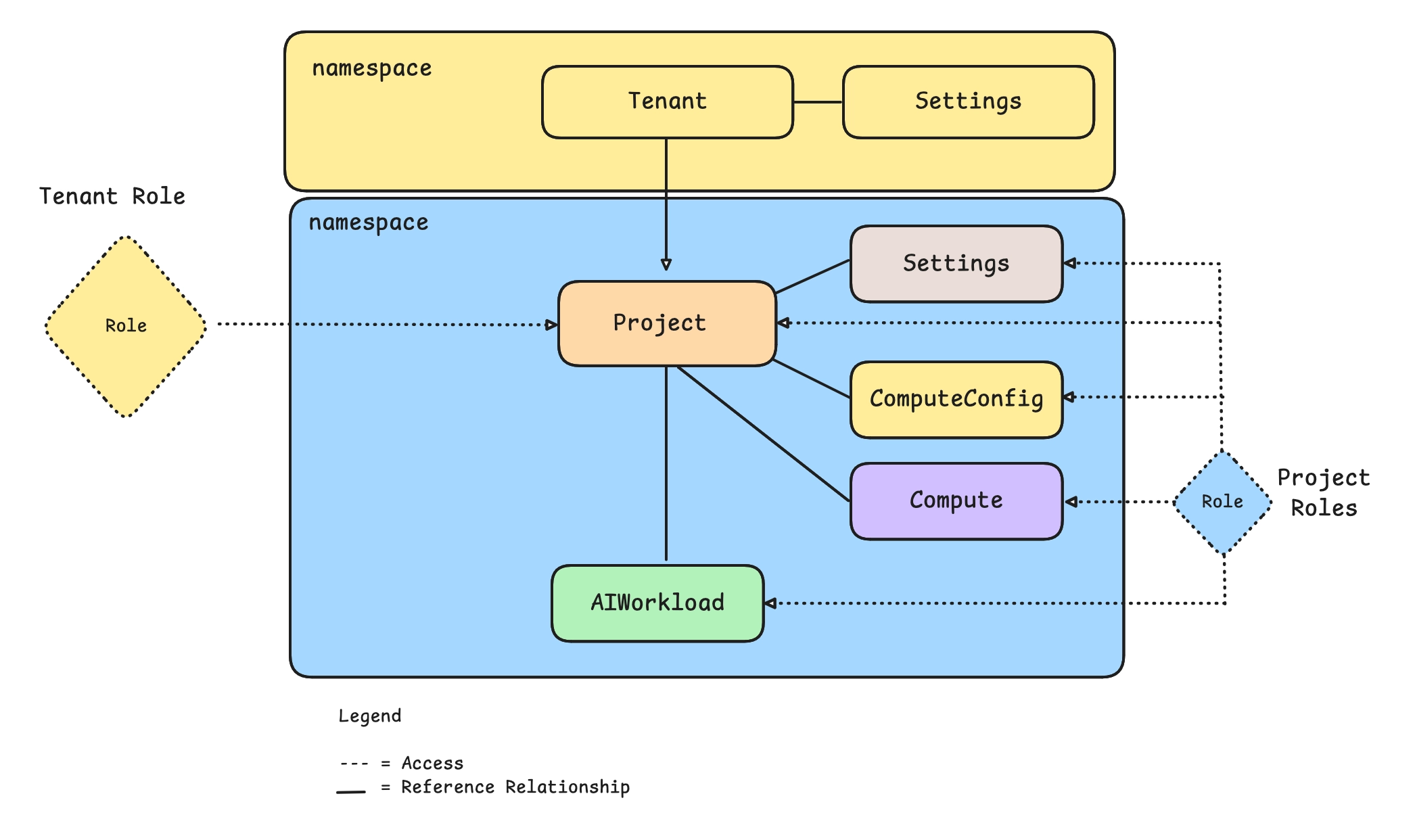
Tenant Configuration
Tenants reference a Settings resource and define which OIDC groups have administrative access. You can create a Tenant through the UI or declaratively through a YAML manifest.
The settingsRef field specifies a Settings resource that supplies Tenant-level credentials for Tenant-scoped operations. Hugging Face and NVIDIA NGC integrations defined there can be shared with Projects through sharedWith; Palette integrations are never shared. You manage tenant-level Settings on the Settings Ref tab of the Tenant Settings page.
Projects do not inherit the Palette integration from Tenant Settings. Hugging Face and NVIDIA NGC integrations can be shared (subject to sharedWith controls), but Palette integrations must be configured separately at the Project level. Each Project that requires Palette credentials must define its own Palette integration in its Project-scoped Settings resource.
Tenants must reference a ComputeConfig through the computeConfigRef field. This ComputeConfig resides in the tenant namespace and is used to populate defaults for tenant-scoped Compute Pools and AIWorkloads.
Every Project must define its own Settings resource in its Project namespace and reference it through Project.spec.settingsRef. Each Project requires its own Palette integration. For details on how Tenant and Project Settings interact, refer to Settings and Integrations.
Tenant Admin OIDC Groups
PaletteAI stores canonical Kubernetes group names in Tenant.spec.tenantRoleMapping.groups, not the raw display names from your identity provider (IdP). Each entry must be scoped to the Tenant's own metadata.name:
pai:tenant:<tenant-name>:role:tnt-adm— bare tenant-admin tierpai:tenant:<tenant-name>:role:tnt-adm-<suffix>— tenant-admin tier with a suffix derived from the IdP group name you configured (slugified for DNS compatibility)
When you create or edit Tenant admin groups in the PaletteAI UI, you enter the IdP group name (for example, Okta Admins). PaletteAI persists the matching canonical string (for example, pai:tenant:default:role:tnt-adm-okta-admins) on the Tenant resource. In YAML workflows, list the canonical strings directly under tenantRoleMapping.groups.
Hue binds these canonical strings on tenant-admin ClusterRoleBindings. Kubernetes RBAC grants access only when the effective group on the API request exactly matches a binding subject.
When IdP groups must match the canonical strings
Configure the API server to receive the canonical pai:tenant:… group names—not only the human-readable IdP names—in these cases:
- User impersonation is disabled and the hub cluster trusts Dex (or another OIDC issuer) directly. Group claims from the user's token are evaluated by RBAC unchanged.
canvas.impersonationProxy.groupsModeispassthrough(the chart default). Dex group claims are forwarded as-is;groupMapis not applied.kubectl, GitOps, or other API clients authenticate outside the PaletteAI UI. Impersonation mapping applies only to requests Canvas makes on behalf of a logged-in user.
In these setups, configure Dex or your IdP to emit the canonical strings in the JWT groups claim, or switch to impersonation with groupsMode: map (below). Renaming every IdP group to the long canonical form is rarely practical; groupMap is the supported approach when impersonation is enabled.
When you can keep human-readable IdP group names
If canvas.impersonationProxy.enabled is true and groupsMode is map, Canvas translates IdP group names to Kubernetes group names when it calls the API for a logged-in user. Add one groupMap entry per Tenant admin IdP group. The key must be the exact group string Dex returns in the JWT; the value must be the canonical string on the Tenant:
canvas:
  impersonationProxy:
    enabled: true
    userMode: passthrough
    groupsMode: map
    groupMap:
      'Okta Admins':
        - pai:tenant:default:role:tnt-adm-okta-admins
      'Platform SRE':
        - pai:tenant:primary-dev:role:tnt-adm-platform-sre
Obtain each canonical value from kubectl get tenant <tenant-name> -o jsonpath='{.spec.tenantRoleMapping.groups}' or from the User Access tab after you save Tenant admin groups (the UI shows the persisted canonical strings). Every Tenant admin group you add through the UI needs a matching groupMap entry unless the IdP already emits the canonical name.
For local Dex users, assign Kubernetes groups with dexGroupMap (keyed by user email) instead of groupMap. dexGroupMap requires groupsMode: map.
After you change groupMap or dexGroupMap, apply the update through helm upgrade or the canvas-config secret so Canvas reloads the configuration. Confirm effective groups on the PaletteAI whoami page (/ai/whoami).
Important: groupMap affects only Kubernetes API requests made through Canvas. It does not change Dex JWT tokens and does not apply to direct kubectl OIDC login unless you configure equivalent mapping for that client.
Project roleMapping groups
Project Viewer, Editor, and Admin groups (Project.spec.roleMapping) are separate from tenant admin groups. They are not rewritten to the pai:tenant:… format. Map them through groupMap only when you use impersonation and the IdP names differ from the strings stored on the Project.
For step-by-step impersonation setup, refer to Configure User Impersonation. For access diagnostics, refer to Troubleshooting Tenants.
apiVersion: spectrocloud.com/v1alpha1
kind: Tenant
metadata:
  name: primary-dev
spec:
  displayName: 'Primary Dev'

  # Default compute configuration
  computeConfigRef:
    name: default

  # Palette integration credentials
  settingsRef:
    name: dev-settings
    namespace: tenant-primary-dev

  # OIDC groups with tenant-level access. Each entry must be scoped to this Tenant's own
  # metadata.name in the form pai:tenant:<tenant-name>:role:tnt-adm or
  # pai:tenant:<tenant-name>:role:tnt-adm-<suffix>; the Tenant validating webhook rejects
  # unscoped or cross-tenant group strings.
  tenantRoleMapping:
    groups:
      - pai:tenant:primary-dev:role:tnt-adm-admin
      - pai:tenant:primary-dev:role:tnt-adm-sre
      - pai:tenant:primary-dev:role:tnt-adm-operations

  # Restricts which Dex connectors may authenticate the groups above. Optional; omit for
  # unrestricted (pre-existing) behavior. See "Per-Tenant Dex Connector Isolation" below.
  identityConnectorRefs:
    - okta

  # GPU quotas for all Projects in this Tenant
  gpuResources:
    limits:
      'NVIDIA A100-SXM4-80GB | 80 GB': 64
      'NVIDIA H100 PCIe | 80 GB': 48
    requests:
      'NVIDIA A100-SXM4-80GB | 80 GB': 8
      'NVIDIA H100 PCIe | 80 GB': 8
Per-Tenant Dex Connector Isolation
spec.identityConnectorRefs is an optional list of Dex connector IDs (matching dex.config.connectors[].id in the Mural Helm values). When set, the Tenant validating webhook additionally verifies — on every Tenant CR update or delete performed by a caller whose OIDC groups match this Tenant's tenantRoleMapping.groups — that the caller authenticated through one of the listed connectors, before honoring that group membership.
This closes a gap in group-claim trust: without a connector check, any upstream identity provider (IdP) administrator behind Dex can mint a token whose group claim happens to match another Tenant's tenantRoleMapping.groups, gaining tenant-admin access to a Tenant its user never belonged to. Pinning identityConnectorRefs means a group claim only grants access when it was asserted through a connector this Tenant actually trusts.
When identityConnectorRefs is empty or unset, no connector restriction is enforced, matching prior behavior — this keeps the field backward compatible and safe to leave unset during migration.
For this check to take effect, the cluster must surface the caller's Dex connector ID on admission requests:
-
Direct Dex trust — Map the ID token's
federated_claims.connector_idclaim (which Dex sets when the client requests thefederated:idscope) into thedex.io/connector-idAuthenticationConfigurationextra key. Refer to Configure Kubernetes API Server to Trust OIDC Provider. -
User impersonation — Set
canvas.oidc.extraScopesto includefederated:idso Canvas requests that claim at login, decodes it from the session ID token, and forwards it viaImpersonate-Extra-dex.io/connector-id. Refer to Configure User Impersonation.
If a Tenant sets identityConnectorRefs but neither path provides a connector ID, tenant-admin-group callers cannot be verified and their Tenant CR update/delete requests are denied.
Tenant Visibility
PaletteAI does not show every Tenant to every user. A Tenant appears in the UI for a user through either of the following paths:
-
Tenant admin access — The user's OIDC group is listed in the Tenant's
spec.tenantRoleMapping.groups. Tenant admins can view and manage the Tenant and all of its Projects, even when the Tenant has no Projects yet. -
Project access — The user's OIDC group is listed in the
roleMapping(as a viewer, editor, or admin) of at least one Project within the Tenant. The Tenant then appears so the user can reach those Projects.
A user who is neither a Tenant admin nor a member of any Project in the Tenant cannot view or access the Tenant in the UI.
When to Create Multiple Tenants
For most deployments, a single Tenant with multiple Projects is sufficient. Projects can reference different Settings resources if they need different Palette credentials.
Consider multiple Tenants if you need any of the following:
-
Separate GPU quota pools — Each Tenant has independent GPU limits. If different organizations have separate GPU allocations that should not be shared, use separate Tenants.
-
Isolated administrative boundaries — Tenant admin groups (
tenantRoleMapping) receive access to all Projects within that Tenant. Separate Tenants ensure one organization's admins cannot view another organization's Projects. -
Independent usage tracking — Tenant status tracks GPU usage per Project. Separate Tenants provide separate usage reports for billing or chargeback.
If your teams can share a common GPU pool and administrative visibility is not a concern, we recommend creating a single Tenant for easier management.
Tenant-Scoped Resources
PaletteAI lets a Tenant admin create certain resources once in the Tenant namespace and share them across the Projects in that Tenant. This avoids duplicating the same Compute Pool, deployment, or Profile Bundle in every Project that needs it.
By default, every resource a user creates lives in a Project namespace and is only usable within that Project. Tenant-scoped resources make the Tenant namespace a first-class scope: a Tenant admin owns the resource, and Projects consume it without owning or modifying it. For the full scope model, refer to Multi-Tenancy.
Shareable Resources
A Tenant admin can create and share the following resources from the Tenant namespace:
-
Compute Pools — Shared infrastructure that Projects can view and clone.
-
App Deployments and Model Deployments - Workloads published centrally for Projects to consume.
-
Profile Bundles — Standard packs imported once and reused across Projects. To create custom Profile Bundles, you must create them at the Project scope.
Scaling Policies and Compute Configs can also be shared from the Tenant namespace.
Settings and their integrations are also shared from the Tenant namespace, but they follow an inheritance model rather than the view-and-clone model described here. For that behavior, refer to Settings and Integrations.
Tenant admins create some tenant-scoped resources, such as Compute Configs, Scaling Policies, and integrations, from the Tenant Settings page. Create tenant-scoped Compute Pools and deployments the same way you create them in the Project scope. For step-by-step guidance, refer to the applicable creation process for Compute Pools, App Deployments, and Model Deployments.
What Projects Can Do with Shared Resources
A Project that has been granted access to a tenant-scoped resource can do the following.
-
View the resource in the PaletteAI UI.
-
Clone it into the Project, which creates an independent Project-scoped copy that the Project owns and can customize. Shared Compute Pools, Profile Bundles, and Scaling Policies appear in Project lists with a Tenant scope badge and support the Clone action only.
-
Use tenant-deployed models and applications that the Project is allowed to access.
A Project user cannot modify or delete a tenant-owned resource. For example, to run a workload on shared infrastructure, a Project user can deploy an application or model onto a tenant-scoped Compute Pool that is shared with the Project, or clone the Compute Pool into the Project to get an independent, editable copy.
For the steps to view and clone tenant-shared resources from a Project, refer to Create and Manage Project Settings.
Sharing with Projects
Tenant-scoped resources are shared with Projects through the sharedWith field. Its keys are Project names: omit the field to share with every Project in the Tenant, or set an empty map ({}) to share with none.
apiVersion: spectrocloud.com/v1alpha1
kind: ComputePool
metadata:
  name: shared-a100-pool
  namespace: tenant-primary-dev
spec:
  # Only these Projects can view and clone this Compute Pool.
  sharedWith:
    project-alpha:
      - '*'
    project-beta:
      - '*'
  # ... remaining Compute Pool spec ...
Sharing grants read access, not write: a Project can view and clone the resource but cannot modify it. PaletteAI enforces this with per-resource Kubernetes Roles in the Tenant namespace, and the list verb is intentionally withheld, so the UI lists shared resources on the user's behalf and filters them by sharedWith. For the full sharedWith policy — globs, exclusions, and nil versus {} semantics — and how read RBAC is enforced, refer to Sharing Resources. For the exact resources and verbs these Roles grant, refer to Shared Tenant-Scoped Resource Permissions.
GPU Quotas
GPU quotas prevent resource exhaustion and ensure fair allocation across teams. Quotas can be set at the Tenant and Project levels.
System-wide GPU limits, per-Tenant ceilings, per-workload request caps, and system-namespace reservations are configured on the System resource, not the Tenant. For those controls, refer to System GPU Quotas.
Quota Types
| Field | Available on | Purpose |
|---|---|---|
limits | - Project - Tenant | Maximum total GPU usage per GPU variant within the scope, summed across all of its Compute Pools. Deployments consume from this budget through the Compute Pool they run on. |
requests | - Project - Tenant | Maximum GPUs that a single Compute Pool can request per GPU variant. |
tenantReservations | - Tenant | Portion of the Tenant limits reserved exclusively for tenant-namespace resources. The remainder (limits - tenantReservations) is the budget shared by all Projects. |
projectLimits | - Tenant | Per-Project ceiling that the Tenant admin can impose, keyed by Project name and then by GPU variant. Caps a Project's usage in addition to its own limits. |
All quota keys are GPU variant names (for example, NVIDIA A100-SXM4-80GB | 80 GB, NVIDIA H100 PCIe | 80 GB). Use the special key Default to set a per-variant catch-all for any GPU variant not listed explicitly.
gpuResources:
  limits:
    'NVIDIA A100-SXM4-80GB | 80 GB': 32 # Up to 32 A100s total within this scope
  requests:
    'NVIDIA A100-SXM4-80GB | 80 GB': 8 # A single Compute Pool can request up to 8 A100s
Default Quotas
Use the Default key to set quotas for GPU variants not explicitly listed. The Default key acts as a per-variant catch-all cap. Each unlisted GPU variant individually gets up to the specified limit.
gpuResources:
  limits:
    'NVIDIA A100-SXM4-80GB | 80 GB': 32
    'Default': 16 # Each unlisted GPU variant is limited to 16 total
  requests:
    'NVIDIA A100-SXM4-80GB | 80 GB': 8
    'Default': 4 # Each unlisted GPU variant is limited to 4 per request
Project-Tenant Quota Interaction
- At admission, when you create or update a Project, its
limits.<variant>andrequests.<variant>must each be less than or equal to the parent Tenant'slimits.<variant>andrequests.<variant>for the same variant. If the Tenant only specifies aDefault, that catch-all is used. - When a Compute Pool is created or updated, a single Project's GPU usage for a variant is capped at the lowest of the values that are set (each with a
Defaultfallback): the Project's ownlimits.<variant>, the Tenant'slimits.<variant>, and the Tenant'sprojectLimits[<this Project>].<variant>. - The Tenant's
limits.<variant>is also enforced at aggregate scope: combined usage across all Projects plus the tenant namespace must not exceed it. - If a Project does not specify
limitsfor a variant, it adds no ceiling of its own, but the Tenant'slimits.<variant>(orDefault) still caps that Project individually, and the Tenant's aggregatelimitsand anyprojectLimitsceiling continue to bound usage. - If a variant is constrained by neither the Tenant nor the Project, that is, there is no explicit entry and no
Default, PaletteAI does not restrict GPU usage for that variant.
Tenant Namespace Reservations
Compute Pools and deployments can also be created directly in the tenant namespace (tenant-<tenant-name>), outside of any Project, and shared across Projects. For the sharing and access model, refer to Tenant-Scoped Resources. By default, the full Tenant limits budget is available to Projects and tenant-namespace resources have no GPU quota, meaning a Compute Pool or deployment that requires GPUs cannot be deployed in the tenant namespace.
To enable tenant-namespace GPU usage, set tenantReservations. Each entry must be less than or equal to the corresponding limits entry for the same variant.
gpuResources:
  limits:
    'NVIDIA A100-SXM4-80GB | 80 GB': 32
  tenantReservations:
    'NVIDIA A100-SXM4-80GB | 80 GB': 8 # Tenant namespace gets 8; Projects share the remaining 24
The reservation enforces symmetric isolation:
- Tenant-namespace resources may not exceed
tenantReservations. - Combined GPU usage across all Projects may not exceed (
limits - tenantReservations).
Per-Project Ceilings
Use projectLimits to cap how many GPUs a specific Project can consume across all of its Compute Pools and the deployments that run on them, regardless of the Project's own limits.
gpuResources:
  limits:
    'NVIDIA A100-SXM4-80GB | 80 GB': 32
  projectLimits:
    project-a:
      'NVIDIA A100-SXM4-80GB | 80 GB': 16
    project-b:
      'NVIDIA A100-SXM4-80GB | 80 GB': 8
    Default:
      'NVIDIA A100-SXM4-80GB | 80 GB': 4 # Any Project not listed gets at most 4 A100s
When both projectLimits[<project>].<variant> and the Project's own gpuResources.limits.<variant> are set, the Project's effective cap is the lower of the two.
Oversubscription
PaletteAI automatically tracks GPU usage in real time under status.gpuUsage in the respective Tenant and Project Custom Resource Definitions (CRDs). At the Tenant level, status.tenantGpuUsage separately tracks usage by tenant-namespace resources.
status:
  gpuUsage:
    project-a:
      'NVIDIA A100-SXM4-80GB | 80 GB': 12
      'NVIDIA H100 PCIe | 80 GB': 8
    project-b:
      'NVIDIA A100-SXM4-80GB | 80 GB': 4
      'NVIDIA H100 PCIe | 80 GB': 4
  tenantGpuUsage:
    'NVIDIA A100-SXM4-80GB | 80 GB': 4
status:
  gpuUsage:
    'NVIDIA A100-SXM4-80GB | 80 GB': 12
    'NVIDIA H100 PCIe | 80 GB': 8
Use the following commands to check GPU usage at the Tenant and Project levels.
kubectl get tenant <tenant-name> --output jsonpath='{.status.gpuUsage}'
kubectl get tenant <tenant-name> --output jsonpath='{.status.tenantGpuUsage}'
kubectl get project <project-name> --namespace <project-namespace> --output jsonpath='{.status.gpuUsage}'
When concurrent requests cause usage to exceed limits, the following sequence occurs.
-
The Tenant
TenantNotOversubscribedcondition or the ProjectNotOversubscribedcondition becomesFalse. -
New GPU requests are blocked until usage drops below limits. App Deployments and Compute Pools requesting GPUs remain in a pending state.
-
After operators delete existing workloads and usage drops below limits, the condition clears and new requests can proceed.
The Tenant status.oversubscribedVariants field records which GPU variants are oversubscribed and at which scope:
Tenant- Overall tenant usage (Projects + tenant namespace) exceedslimitsfor the variant. Blocks all new GPU resources for that variant.TenantNamespace- Tenant-namespace usage exceedstenantReservationsfor the variant. Blocks only new tenant-namespace GPU resources for that variant; Projects can continue consuming GPUs up to their cap.
status:
  oversubscribedVariants:
    'NVIDIA A100-SXM4-80GB | 80 GB': Tenant
    'NVIDIA H100 PCIe | 80 GB': TenantNamespace
Use the following commands to check the oversubscription status at the Tenant and Project levels.
kubectl get tenant <tenant-name> --output jsonpath='{.status.conditions[?(@.type=="TenantNotOversubscribed")]}'
kubectl get tenant <tenant-name> --output jsonpath='{.status.oversubscribedVariants}'
kubectl get project <project-name> --namespace <project-namespace> --output jsonpath='{.status.conditions[?(@.type=="NotOversubscribed")]}'