OCI Registries
PaletteAI uses OCI (Open Container Initiative) registries to store and distribute workload artifacts between hub and spoke clusters. When you create an App Deployment or Model Deployment, the spoke cluster's Workload controller renders your Workload Profile into Kubernetes manifests, packages them as OCI artifacts, and stores them in the spoke's OCI registry. Flux controllers on the spoke then pull these artifacts and apply them.
This page explains how OCI registries fit into PaletteAI's architecture and the topology options available for different deployment scenarios.
OCI Registries in PaletteAI
OCI registries serve as the distribution mechanism between hub and spoke clusters. They are used in two ways:
-
Workload deployment - When a WorkloadDeployment is created, the hub's WorkloadDeployment controller resolves the Workload Profile and Environment, then dispatches a
WorkloadCustom Resource to the target spoke clusters via Open Cluster Management (OCM). The spoke's Workload controller renders the Workload Profile into Kubernetes manifests, packages them as an OCI artifact, and pushes them to the spoke's OCI registry. Flux on the spoke then pulls these artifacts and applies them. -
Resource federation - The hub also pushes Definitions and Project configuration to spoke OCI registries so that spokes have the templates and identity information they need to operate. This federation flow runs from the hub to each spoke's registry.
This approach decouples the hub from directly applying resources on spokes. For workload content, the spoke writes to its own registry and Flux reads from it. For federated resources (Definitions, Project identity), the hub writes to spoke registries and the spokes read from them.
Registry Requirements
For an OCI registry to work with PaletteAI, it must:
-
Conform to the OCI Distribution Spec.
-
Accept arbitrary media types (registries that restrict media types, such as Docker Hub, are not supported).
Compatible registry types include, but are not limited to, the following:
-
Amazon Elastic Container Registry (ECR)
-
Azure Container Registry (ACR)
-
Google Artifact Registry
-
GitHub Container Registry (GHCR)
-
Harbor
-
Zot (included with PaletteAI)
Topology Options
PaletteAI supports several OCI registry topologies depending on your deployment scenario.
| Topology | Best For | Learning Curve |
|---|---|---|
| Hub-as-Spoke | - Learning PaletteAI - Development environments - Demos | Beginner |
| Single External Registry | - Most production environments | Intermediate |
| Registry on Hub | - Organizations without a central OCI registry | Advanced |
| Multiple Registries | - Spoke clusters in isolated networks | Advanced |
Hub-as-Spoke
The PaletteAI appliance installation includes a Zot OCI registry that operates inside the hub cluster. In hub-as-spoke mode, where the hub also acts as a spoke, both the hub controllers and Flux can reach the registry via internal Kubernetes networking.
This topology requires no additional configuration but is not suitable for production.
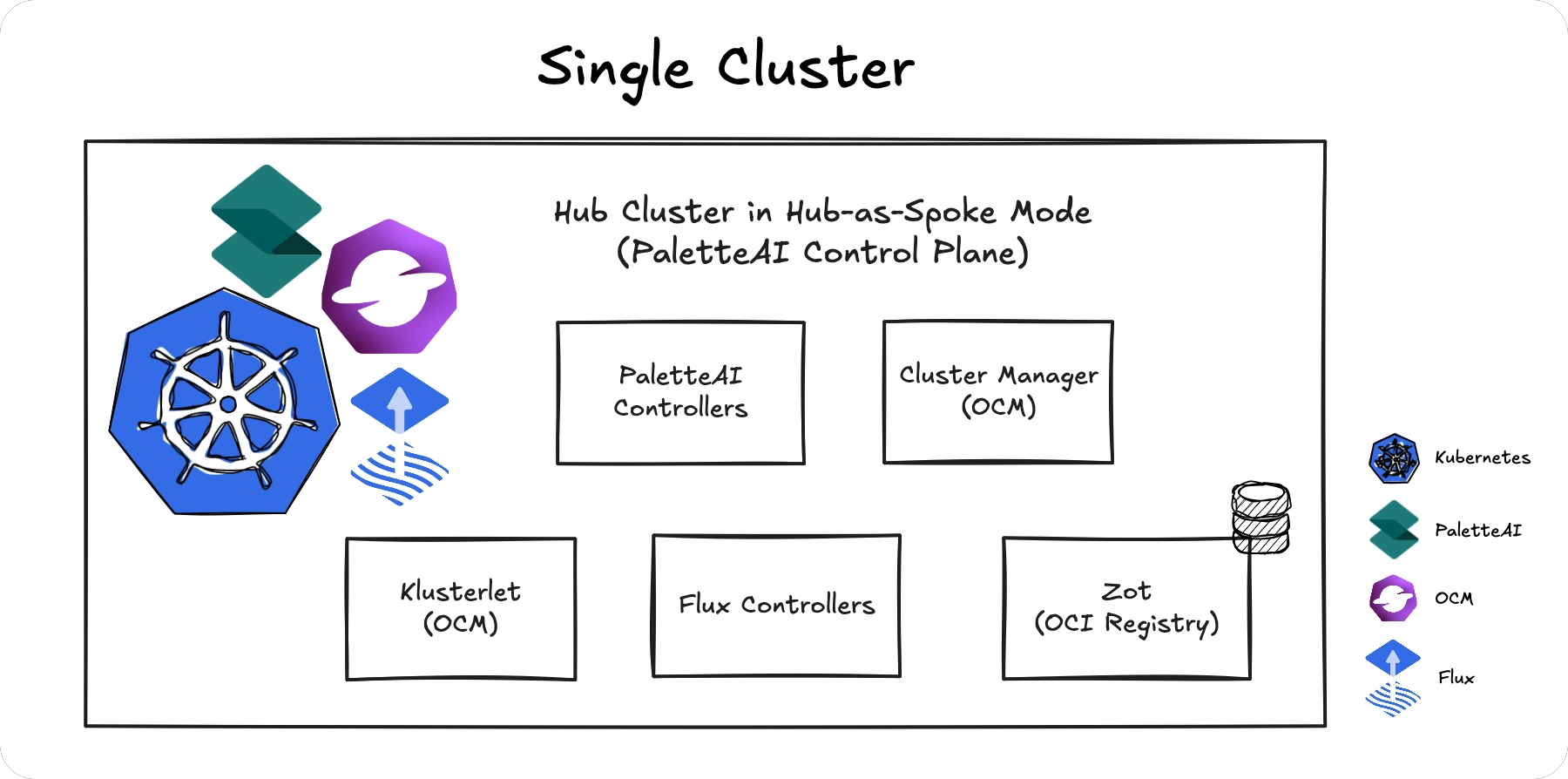
If you add spoke clusters to this topology, the Zot registry must be exposed externally for spokes to reach it.
Single External Registry
Use your organization's existing OCI registry (ECR, ACR, Harbor, etc.) as a shared registry for all clusters. The hub pushes artifacts to the registry, and all spokes pull from the same location.
Requirements
-
All clusters (hub and spokes) must have network connectivity to the registry.
-
Registry credentials must be configured for both the hub and spokes.
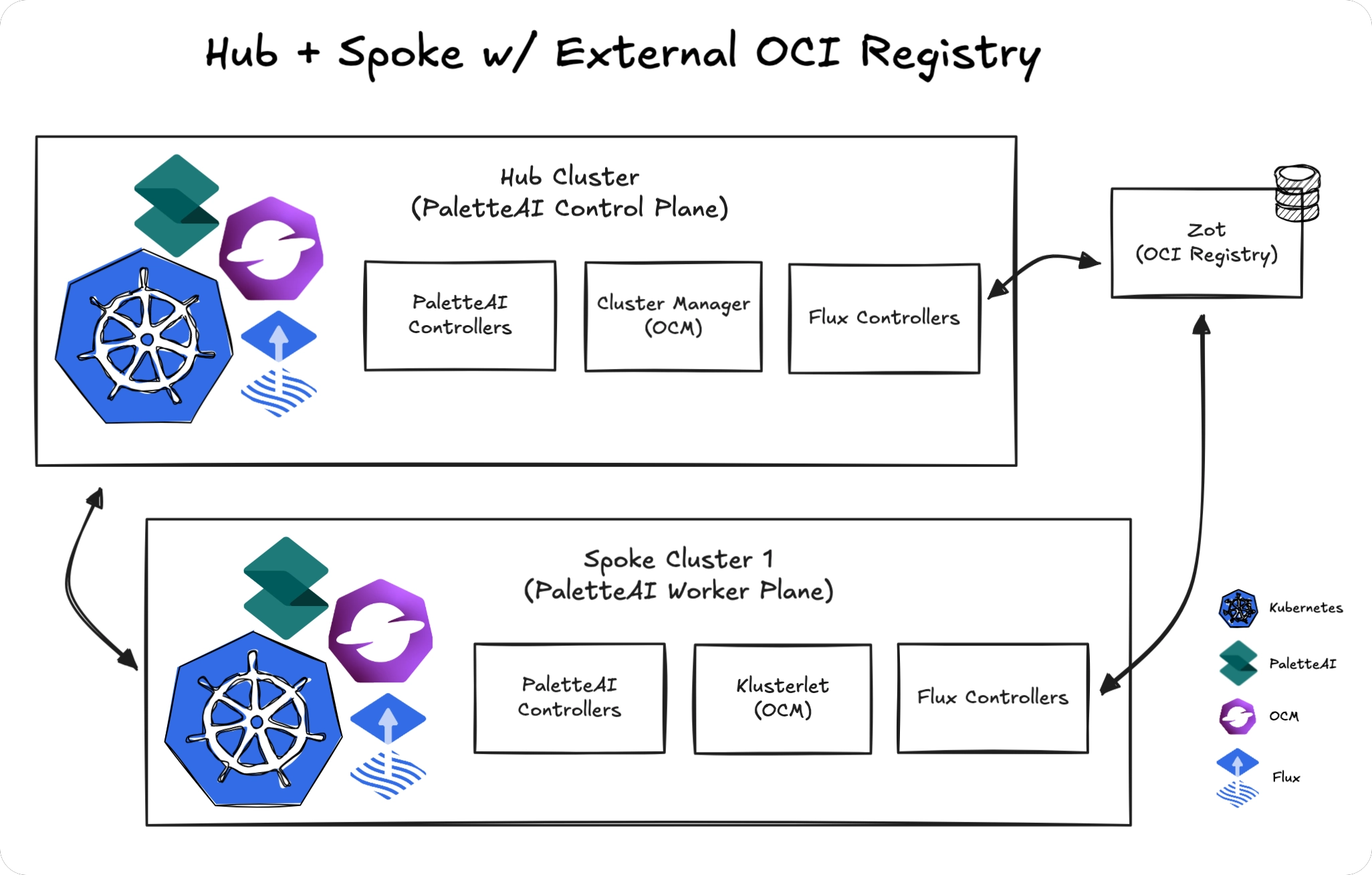
This is the recommended topology for production because it leverages existing infrastructure and provides a single point of management.
Registry on Hub
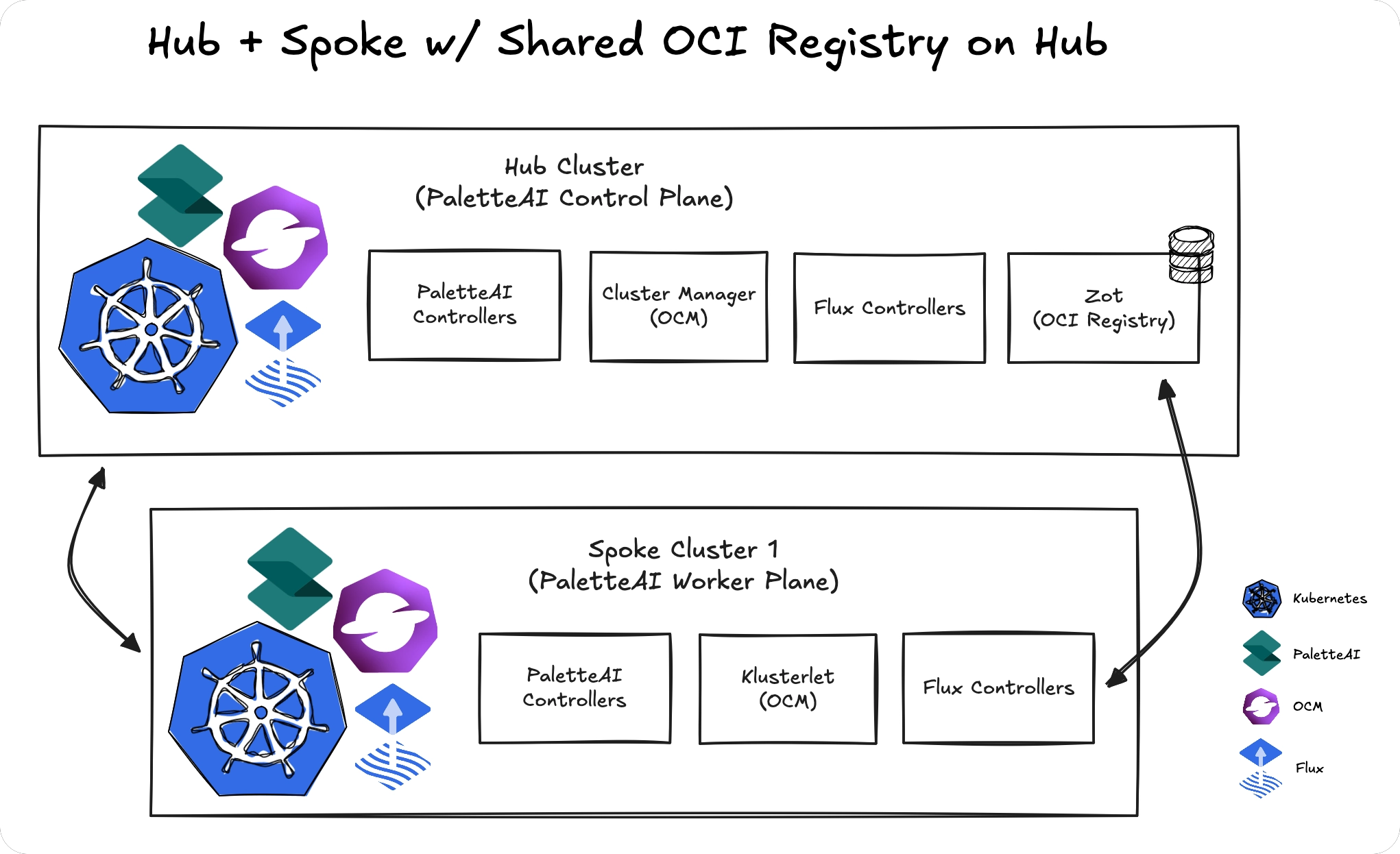
Run a production-grade Zot registry on the hub cluster and expose it externally for spoke clusters to access.
Note that this topology adds operational complexity compared to using an existing external registry.
Requirements
-
Zot must be configured with multiple replicas and persistent storage. Refer to Migrate Zot Registry to Persistent Storage for instructions on configuring persistent storage or migrating from ephemeral storage.
-
The registry must be exposed via a Kubernetes Ingress or load balancer.
-
All spoke clusters must have network connectivity to the hub's registry endpoint.
Multiple Registries
Configure separate OCI registries for different clusters or regional groups when network restrictions prevent a shared registry. Using multiple OCI registries is more resilient than a shared model; however it is more complex to configure and comes with a major caveat.
Resource Federation
PaletteAI automatically distributes and synchronizes (federates) certain resources from the hub cluster to spoke clusters via OCI registries. This ensures spokes have the resources they need without manual synchronization.
PaletteAI runs three separate OCI sync pipelines on the hub to federate resources to spoke clusters. Each pipeline serves a different purpose and operates at a different scope.
Definitions (Tenant-Scoped)
Definitions are the CUE-based templates that tell a spoke cluster how to render workloads, including what Component, Trait, and Policy types are available. They are shared across all Projects within a Tenant so that a ComponentDefinition created in one Project is available to workloads in any other Project under the same Tenant.
The hub periodically bundles all ComponentDefinitions, TraitDefinitions, and PolicyDefinitions from three namespace scopes:
- The system definition namespace (
mural-systemby default) - Built-in Definitions shipped with PaletteAI. - The Tenant's workload namespace (
tenant-<tenant-name>) - Definitions scoped to the Tenant. - Every Project namespace belonging to that Tenant - Definitions created within individual Projects.
This bundle is pushed to the OCI registries of all spoke clusters associated with that Tenant. Each spoke pulls the bundle using the OCI tag <tenantName>-tenant-spoke-definitions and applies the Definitions locally, ensuring consistent rendering capabilities across the Tenant while maintaining isolation between Tenants.
Project Identity and Configuration (Project-Scoped)
A spoke cluster belongs to exactly one Project and needs to know its own identity and configuration in order to operate. The hub pushes a separate bundle containing management resources to each spoke:
- The Project resource the spoke belongs to.
- The parent Tenant resource.
- Settings and any relevant integration Secrets configured for that Project.
This bundle is pushed only to the OCI registries of spokes within that specific Project's namespace, using the OCI tag <projectName>-project-definitions. Unlike Definitions, which are shared across a Tenant, these resources are scoped to a single Project, which means each spoke receives only the configuration for its own Project.
Tenant Resources (Tenant Workload Namespace Spokes)
When a spoke exists in a tenant workload namespace (tenant-<tenantName>) rather than a project namespace, and no Project exists in that namespace, the hub federates tenant management resources using a third pipeline:
- The Tenant resource.
- Settings and integration Secrets configured for the Tenant.
- Namespace stubs for the tenant workload namespace and all project namespaces under that Tenant.
This bundle is pushed to spokes in the tenant workload namespace using the OCI tag tenant-<tenantName>-project-definitions (the same tag format as project namespaces). When a Project exists in the namespace, the project-scoped federation pipeline takes precedence over the tenant resources pipeline.
The hub determines which pipeline to use by checking whether the spoke's namespace contains an active (non-deleting) Project. If a Project is found, the project-scoped pipeline applies. If no Project is found, the hub checks if the namespace is a tenant workload namespace and applies the tenant resources pipeline if applicable.
Requirements
-
Each spoke must have network connectivity to its configured registry.
-
For automatic Definition and Project-Scoped Resource synchronization, the hub must be able to reach all spoke registries.
-
All spokes must have network connectivity to the hub's API server.
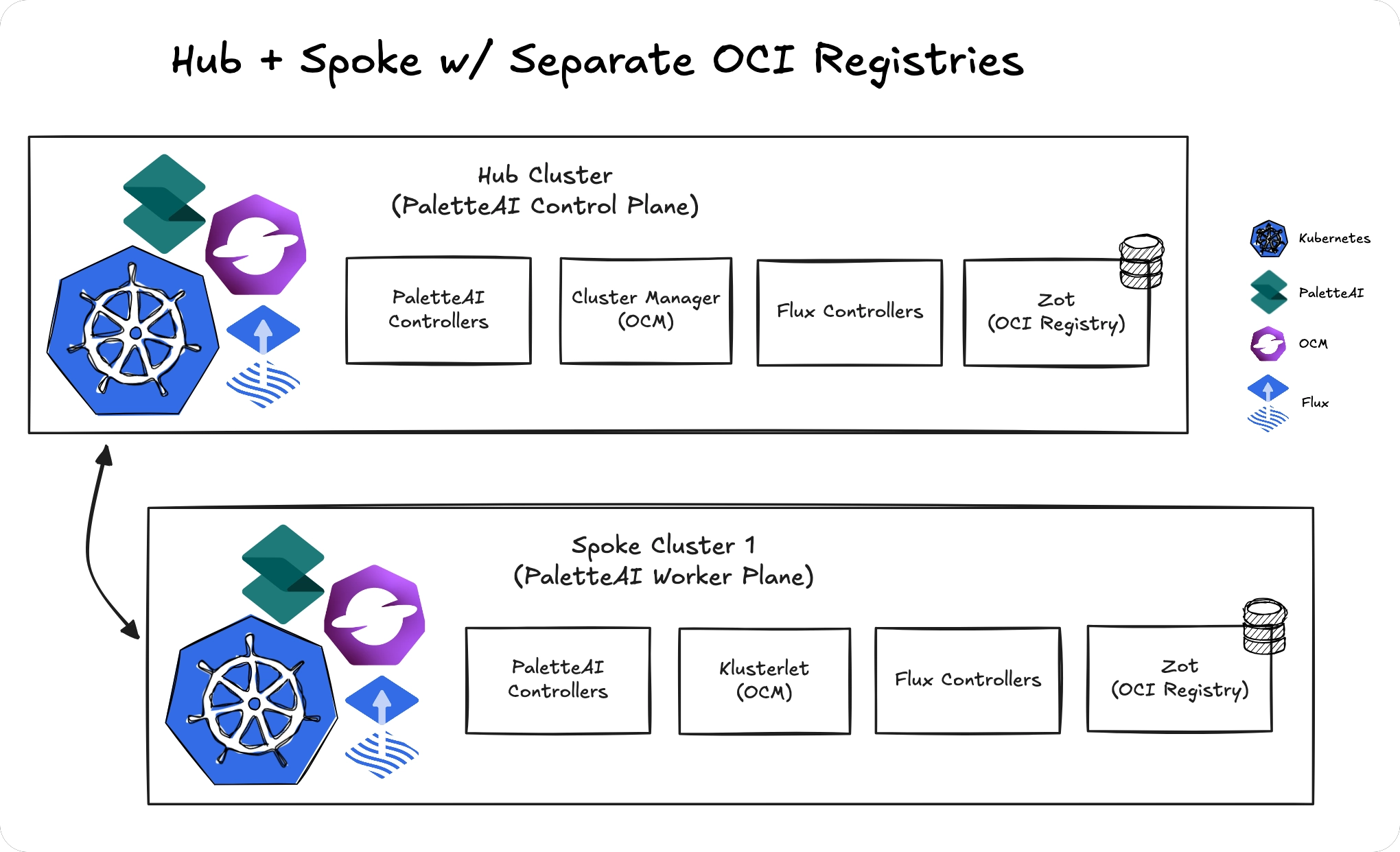
If a spoke's registry is not reachable from the hub, Project and Definition changes must be manually synchronized to that spoke.
Helm Chart Configuration
OCI registry configuration is specified in the PaletteAI Helm chart values.
-
Hub cluster -
hue.ociRegistry -
Spoke clusters -
fleetConfig.spokes[<index>].ociRegistry, where<index>is the name of any valid spoke cluster.
Although there are multiple locations within the Helm chart values where an OCI registry may be configured, most configuration options are shared between hub and spoke sections. The enabled and interval fields apply only to the hub configuration (hue.ociRegistry).
ociRegistry:
  # Whether to enable an OCI registry for tracking Workload revisions. Hub config (hue.ociRegistry) only.
  enabled: true
  # The endpoint of the OCI registry. Must be routable from the Hub cluster.
  endpoint: 'oci://zot.mural-system.svc.cluster.local:5000'
  # The repository to use within the OCI registry for storing Mural artifacts.
  repository: 'mural-workloads'
  # If true, skip TLS verification of the OCI registry.
  insecure: true
  # Interval at which the OCIRepository URL is checked for updates. Hub config (hue.ociRegistry) only.
  interval: 5m
  # Timeout for remote OCI Repository operations like pushing/pulling; defaults to 60s.
  timeout: 60s
  # The credential provider to use for OCI registry. Supported values: 'aws', 'azure', 'gcp', 'generic'.
  provider: 'generic'
  # If provided, basicAuth will be ignored. Must exist in the release namespace.
  basicAuthSecretName: ''
  # If provided, a secret named 'oci-basic-auth' will be created and used for basic auth.
  basicAuth:
    # The username to use for the OCI registry.
    username: 'user'
    # The password to use for the OCI registry.
    password: 'user'
  # If provided, proxyData will be ignored. Must exist in the release namespace.
  proxySecretName: ''
  # If provided, a secret named 'oci-proxy' will be created and used for proxy configuration.
  proxyData: {}
  # address: "http://proxy.example.com:8080"
  # username: "user"
  # password: "password"
  # If provided, certData will be ignored. Must exist in the release namespace.
  certSecretName: ''
  # If provided, a secret named 'oci-tls' will be created and used for TLS verification.
  certData: {}
  # ca.crt: |
  #   -----BEGIN CERTIFICATE-----
  #   ...
  #   -----END CERTIFICATE-----
  # tls.crt: |
  #   -----BEGIN CERTIFICATE-----
  #   ...
  #   -----END CERTIFICATE-----
  # tls.key: |
  #   -----BEGIN PRIVATE KEY-----
  #   ...
  #   -----END PRIVATE KEY-----