Profile Bundles
Profile Bundles package infrastructure and application configurations for consistent, repeatable deployments across Compute Pools. Define the configuration once in a Profile Bundle and then reuse it where needed instead of manually configuring each deployment's software components.
You can create Profile Bundles in the PaletteAI UI or import them from an archive through the PaletteAI UI or the PaletteAI CLI. PaletteAI Studio offers a catalog of ready-to-use Profile Bundles for a wide range of use cases, including AI/ML applications, models, infrastructure, and Fullstack deployments. PaletteAI uses Profile Bundles in most workflows, including Compute Pool deployments and AI/ML application and model deployments. A Profile Bundle can include Palette cluster profiles, Workload Profiles, or both, depending on the type of Profile Bundle.
Components of a Profile Bundle
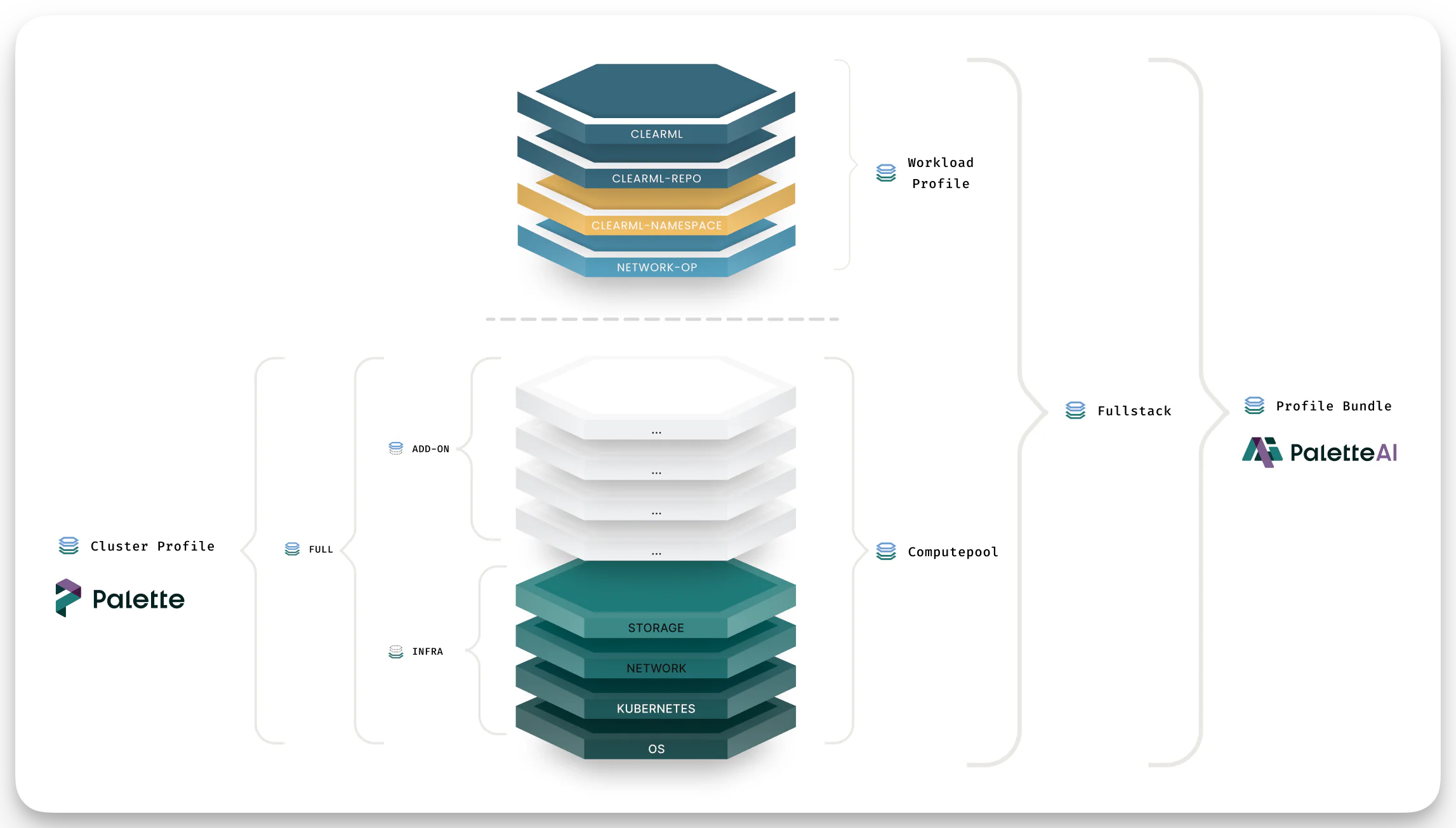
Cluster Profiles and Workload Profiles are the building blocks of a Profile Bundle. At a high level, Cluster Profiles establish cluster infrastructure. Workload Profiles deploy applications and models to the cluster. Cluster Profiles are created and managed in Palette. Workload Profiles and the Profile Bundle itself are created and managed in PaletteAI.
Cluster profiles can also carry operational add-ons for spoke clusters, such as monitoring and GPU support. For example, if you want PaletteAI to ship GPU metrics from spoke clusters with prometheus-agent or prometheus-agent-minimal, you can include the NVIDIA GPU Operator in an Add-on Cluster Profile that is referenced by your Profile Bundle. Refer to Configure Prometheus Agent Monitoring for the Prometheus-specific setup requirements.
Cluster Profiles
Cluster profiles contain the core infrastructure software needed to deploy a Kubernetes cluster, such as the Operating System (OS), Kubernetes distribution, Container Network Interface (CNI), and Container Storage Interface (CSI). PaletteAI uses a Cluster Profile primarily for infrastructure-related workflows, such as creating a new Compute Pool. A Profile Bundle can contain multiple Cluster Profiles. Each Cluster Profile may have one Infrastructure or Full cluster profile, and any number of Add-on cluster profiles. Platform engineers or administrators typically create and manage Cluster Profiles in Palette.
When you create a Profile Bundle through the PaletteAI UI, PaletteAI displays the Cluster Profiles available in the Palette project configured in your Settings resource. The PaletteAI UI displays only Cluster Profiles with a type of Infrastructure or Full and a cloud type of Edge Native.
Cluster Profile Types
Palette supports three Cluster Profile types:
-
Infrastructure - Provides the essential components for workload cluster deployments: OS, Kubernetes distribution, network, and storage. For more information, review the Create an Infrastructure Profile guide.
-
Add-on - Composed exclusively of add-on layers, designed for reusability across multiple clusters and projects. Add-on profiles can be combined with infrastructure profiles to create a full profile. Review the Create an Add-on Profile guide for details.
-
Full - Combines infrastructure packs with add-on layers into a single profile. Refer to the Create a Full Profile guide for more details.
Workload Profiles
Workload Profiles support application and model deployment workflows.
A Profile Bundle can contain multiple Workload Profiles. Application and Fullstack Profile Bundles must contain at least one Workload Profile of the type Application or Model, while Infrastructure Profile Bundles may optionally include Workload Profiles of the type Infrastructure. A Profile Bundle cannot contain both Application and Model Workload Profiles at the same time; it deploys applications or models, never both.
Workload Profiles are created and managed in PaletteAI by both platform engineers and end users.
Workload Profile Types
PaletteAI supports three Workload Profile types:
-
Application - Used to deploy end-user-facing applications, including their required dependencies that are not infrastructure-related.
-
Model - Used to deploy AI/ML models, including their required dependencies, such as the inference engine, if needed.
-
Infrastructure - Used to deploy infrastructure-related dependencies that are not part of the Cluster Profile. This is useful when you want to deploy an infrastructure-related dependency into the Compute Pool that you do not want Palette to manage. It is also useful when a dependency resides in a private Helm or OCI registry that is defined in PaletteAI but not in Palette.
Types of Profile Bundles
PaletteAI supports three Profile Bundle types:
-
Application - Used to deploy AI/ML applications through the App Deployment workflow. It must be paired with an Infrastructure Profile to deploy a Compute Pool. Refer to the Application Profile Bundle section for more details.
-
Infrastructure - Contains the required infrastructure software components needed to create a Compute Pool. Refer to the Infrastructure Profile Bundle section for more details.
-
Fullstack - Contains the required components to deploy an AI/ML application and a dedicated Compute Pool at the same time. Refer to the Fullstack Profile Bundle section for more details.
Application Profile Bundle
Application Profile Bundles contain only Workload Profiles of the type Application or Model and cannot include Cluster Profiles. They are used to deploy an AI/ML application or model to an existing Compute Pool. To deploy an AI/ML application to a new Compute Pool, use a Fullstack Profile Bundle instead.
In addition to AI/ML applications, you can use an Application Profile Bundle to deploy a model through a Workload Profile of the type Model. When you use the Custom Model Deployment workflow, you may want to specify the inference engine to associate with the Profile Bundle so that PaletteAI can validate Compute Pool compatibility.
Label for the inference engine
If you create the Application Profile Bundle through a YAML manifest for a custom model deployment, add a label to associate the Profile Bundle with the inference engine used for the model deployment. For example, if you use vLLM as the inference engine, you can add the palette.ai/inference-engine label with the value vllm to the Profile Bundle.
apiVersion: spectrocloud.com/v1beta1
kind: ProfileBundle
metadata:
  name: internal-model-345a
  namespace: project-melbourne
  labels:
    palette.ai/inference-engine: vllm
When deploying a model to an existing Compute Pool, PaletteAI validates that the Application Profile Bundle's palette.ai/inference-engine label matches the Compute Pool's Infrastructure Profile Bundle inference engine label. This ensures the Compute Pool infrastructure is compatible with the model's requirements.
For the Model as a Service workflow, PaletteAI auto-selects Profile Bundles based on mappings configured in Project Settings. These mappings match model source attributes to Profile Bundle labels, including the palette.ai/inference-engine label.
Infrastructure Profile Bundle
Infrastructure Profile Bundles are used to deploy a new Compute Pool and are typically managed by platform engineers.
An Infrastructure Profile Bundle must contain at least one Cluster Profile of the type Infrastructure or Full. You can include additional Add-on cluster profiles for software components such as monitoring, ingress, or load balancers.
Infrastructure Profile Bundles typically contain only Cluster Profiles. However, you may include Infrastructure Workload Profiles alongside an infrastructure variant if you need to deploy a dependency outside a Cluster Profile.
In the context of a custom model deployment, you may want to specify the inference engine you deploy with the Infrastructure Profile Bundle. You can do so by adding the palette.ai/inference-engine label to the Profile Bundle YAML manifest with the name of the inference engine as the value, for example vllm. During model deployment, PaletteAI uses this label to validate that the Compute Pool infrastructure is compatible with the model's Application Profile Bundle.
Fullstack Profile Bundle
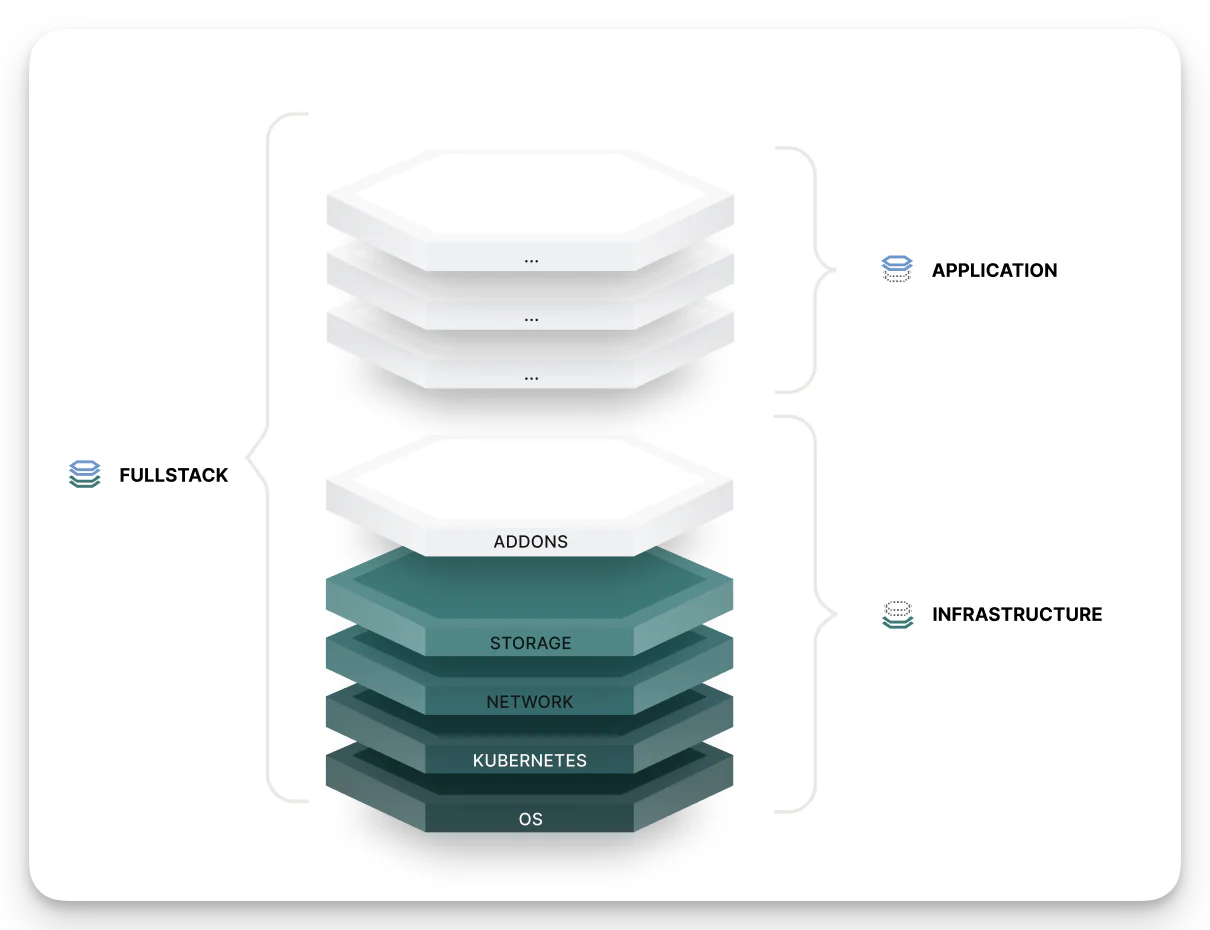
Fullstack Profile Bundles combine infrastructure provisioning and application deployment into a single bundle. You can think of a Fullstack Profile Bundle as an Infrastructure Profile Bundle and an Application Profile Bundle in one.
A Fullstack Profile Bundle must contain at least one Cluster Profile of the type Infrastructure or Full and one Workload Profile of the type Application or Model. It can also include additional Add-on cluster profiles, additional Application or Model Workload Profiles, and Infrastructure Workload Profiles.
When you use a Fullstack Profile Bundle outside its primary workflow, PaletteAI deploys only the relevant elements and ignores the rest. Refer to the Fullstack Profile Bundle Deployment Behavior section for details.
Supported Workflows
The following table shows the common workflows for each Profile Bundle type.
| Deployment Type | Compute Pool Type | Profile Bundle Type |
|---|---|---|
| Compute Pool | Shared | Infrastructure |
| Compute Pool | Dedicated | Infrastructure |
| App Deployment | Dedicated | Fullstack |
| App Deployment | Shared | Application |
| Model Deployment | Dedicated | Fullstack |
| Model Deployment | Shared | Application |
You can also use Profile Bundle types outside their primary workflow, as long as the core requirements are met. Expand the details below to learn more.
Mixing and Matching Profile Bundle Types
| Deployment Type | Compute Pool Type | Supported Profile Bundle Options | Notes |
|---|---|---|---|
| Compute Pool | Dedicated | Fullstack | PaletteAI deploys only the Cluster Profiles and Infrastructure Workload Profiles. |
| Compute Pool | Shared | Fullstack | PaletteAI deploys only the Cluster Profiles and Infrastructure Workload Profiles. |
| App Deployment | Dedicated | Infrastructure + Application | Together, the two Profile Bundles meet the requirements for deploying an AI/ML application to a dedicated Compute Pool. |
| App Deployment | Shared | Fullstack | Since the Compute Pool already exists, PaletteAI deploys only the Application Workload Profiles. |
| Model Deployment | Dedicated | Infrastructure + Application | Together, the two Profile Bundles meet the requirements for deploying a model to a dedicated Compute Pool. |
| Model Deployment | Shared | Fullstack | Since the Compute Pool already exists, PaletteAI deploys only the Model Workload Profiles. |
Fullstack Profile Bundle Deployment Behavior
When you use a Fullstack Profile Bundle in a workflow that does not require all its components, PaletteAI automatically filters the bundle to deploy only the relevant Cluster Profiles and Workload Profiles. It silently ignores the remaining elements. The following table describes what PaletteAI deploys and ignores in each scenario.
| Deployment Type | Compute Pool Type | Cluster Profile | Application WP | Model WP | Infrastructure WP |
|---|---|---|---|---|---|
| Compute Pool | Dedicated | ✅ | ❌ | ❌ | ✅ |
| Compute Pool | Shared | ✅ | ❌ | ❌ | ✅ |
| App Deployment | Dedicated | ✅ | ✅ | ❌ | ✅ |
| App Deployment | Shared | ❌ | ✅ | ❌ | ❌ |
| Model Deployment | Dedicated | ✅ | ❌ | ✅ | ✅ |
| Model Deployment | Shared | ❌ | ❌ | ✅ | ❌ |
For the Model Deployment workflow, PaletteAI auto-selects Profile Bundles based on mappings configured in Project Settings. These mappings match model source attributes to Profile Bundle labels. Refer to Modify Project for configuration details.
Deletion Policy
The deletionPolicy field controls what happens to a Profile Bundle's dependent resources when the Profile Bundle is deleted. Set it at spec.deletionPolicy on the Profile Bundle resource.
The two supported values are:
delete(default) — PaletteAI deletes dependent resources that are no longer referenced by any other Profile Bundle.orphan— PaletteAI removes the Profile Bundle resource but leaves all dependent resources in place.
Affected Resources
When a Profile Bundle is deleted, PaletteAI evaluates each dependent resource to determine whether any other Profile Bundle still references it. A resource is only deleted when deletionPolicy: delete is set and no other Profile Bundle holds a reference to it.
Deleted when deletionPolicy: delete (and no remaining references):
- Palette Cluster Profiles — cluster profiles referenced by the Profile Bundle's infrastructure or add-on variants are deleted from Palette.
- Workload Profiles — workload profiles referenced by any variant of the Profile Bundle are deleted.
- Helm and OCI Repositories — Flux
HelmRepositoryandOCIRepositoryresources managed by the Profile Bundle are deleted. - Component, Trait, and Policy Definitions —
ComponentDefinition,TraitDefinition, andPolicyDefinitionresources managed by the Profile Bundle are deleted.
Preserved when deletionPolicy: orphan (or when other Profile Bundles still reference the resource):
All of the above resources remain in place. You are responsible for cleaning them up manually if they are no longer needed.
If multiple Profile Bundles share the same Palette Cluster Profile, Helm repository, or definition, the shared resource is only deleted after the last referencing Profile Bundle is removed.
PaletteAI Studio
PaletteAI Studio contains a catalog of ready-to-use Profile Bundles for a wide range of use cases. You can browse the catalog to find a Profile Bundle that meets your needs and import it into PaletteAI. PaletteAI Studio downloads Profile Bundles as a .tar.gz archive that contains the files required to create a Profile Bundle in PaletteAI. These files include Cluster Profiles, Workload Profiles, custom definitions, and Flux resources. The Flux resources define Helm repositories and OCI repositories.
Profile Bundles in PaletteAI Studio are self-contained, which means they do not depend on other Profile Bundles. However, Profile Bundles of the types Fullstack and Infrastructure may depend on packs that are not available in your Palette environment. In that case, you must ensure the Pack registry is available in your Palette project.
Import Workflows
You can import Profile Bundles downloaded from PaletteAI Studio from the PaletteAI UI or with the PaletteAI CLI. If the Profile Bundle includes variable sets, PaletteAI imports them. PaletteAI then applies them to the generated profiles.
Refer to the PaletteAI CLI reference page for more information. For detailed instructions, refer to Import a Profile Bundle from the PaletteAI UI or the PaletteAI CLI import workflow.
paletteai studio import --namespace <namespace> <path/to/profilebundle.tar.gz>